Toyota Safety Sense 3.0
Driver monitorDriver monitor**If equippedCamera
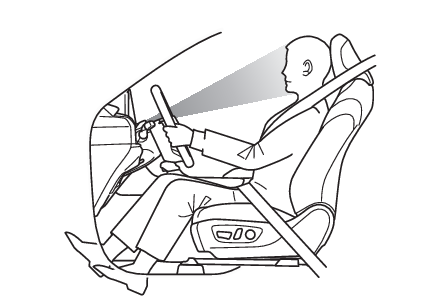
Driver monitorBasic functionsDuring controlled driving, the driver monitor camera detects the position and direction
the driver is facing, and whether their eyes are opened or closed. Through this, the
system determines if the driver is checking their surroundings and if the driver can
perform driving operations.In order to operate properly, the driver monitor camera requires an unobstructed view
of the driver’s face. If the steering column or seat position is either too high or
too low, or if any other condition is present that obstructs the driver monitor camera’s
view of the driver’s face, some driving support systems may not operate properly,
or a warning message may be displayed.Buzzer
Driver monitorWarning functionIn situations such as the following, a buzzer will sound and a message will be displayed
to warn the driver.When the system determines that the driver is not paying attention to the road or
their eyes are closedWhen the driver’s face cannot be detected or the system determines that the driver
has poor driving postureWhen the seated position of the driver is such that the upper or lower part of the
meter is not visible, the driver’s entire face may not be recognized by the driver
monitor camera. To mitigate the appearance of this warning, adjust the steering wheel
and seat position so the driver can see the entire meter.Face identificationThe driver monitor is used as a device to identify faces in order to identify an individual.For information about how to use the face identification function, priorities among
other devices of individual identification, and linked vehicle settings, see “My Settings”.
(My Settings*)Warning:For safe useThe driver monitor is not designed to prevent the driver from driving carelessly or
having a poor driving posture. Pay careful attention to the surrounding conditions
in order to ensure safe driving.The driver monitor cannot reduce drowsiness. If you feel unable to concentrate or
drowsy, take a break and sleep as necessary in order to ensure safe driving.Note:Warning functionThese functions may not operate when the vehicle speed is low.Face identificationFace identification starts when the door is opened then closed.In face identification, facial traits are digitized and stored in a built-in computer,
to be used for identification in My Settings.Face image or video are not stored. Voice is not stored either.Digitized face information is not used for any purpose other than identification in
My Settings. Additionally, face information cannot be decoded and will not be disclosed
or provided to a third party.Face information can be deleted by yourself.For the handling of face information, please consent to the following before using
it:Face identification does not guarantee a complete identity authentication, collation,
or identification.When face information registration fails frequently or face identification fails frequently,
the driver cameras should be cleaned or face information should be registered again.Face information stored in the vehicle computer cannot be decoded or moved to another
media. Therefore, it is necessary to register face information again once it is deleted
or relevant parts are replaced.Once deleted, face information cannot be restored. It is necessary to register face
information again.Situations where face identification may not be performed correctlyThis system is designed for use to identify facial traits. In the following situations,
face information may not be able to be registered or identified correctly:When a part of the driver’s face (eyebrows, eyes, nose, or mouth) is not visibleWhen the driver is wearing glasses/sun glasses, a face mask, muffler, etc.When the driver is not facing frontWhen part of driver’s face is covered with hair, beard, a hand, clothes, jewelry,
etc.When the driver is closing eyesWhen a non-registered driver is a twin, etc. with a registered driver, whose face
looks quite alike with each otherSituations in which the driver monitor may not operate properlySituations in which the driver monitor may not operate properly (if equipped)Changing Driver monitor settingsThe settings of Driver monitor can be changed through customize settings. (Customizable features)