Meter
MetersGaugesGauges and meters (12.3-inch display)Meter displayEngine coolant temperature gaugeOutside temperatureEngine
TachometerTachometerSpeedometerMeter
ClockClockFuel
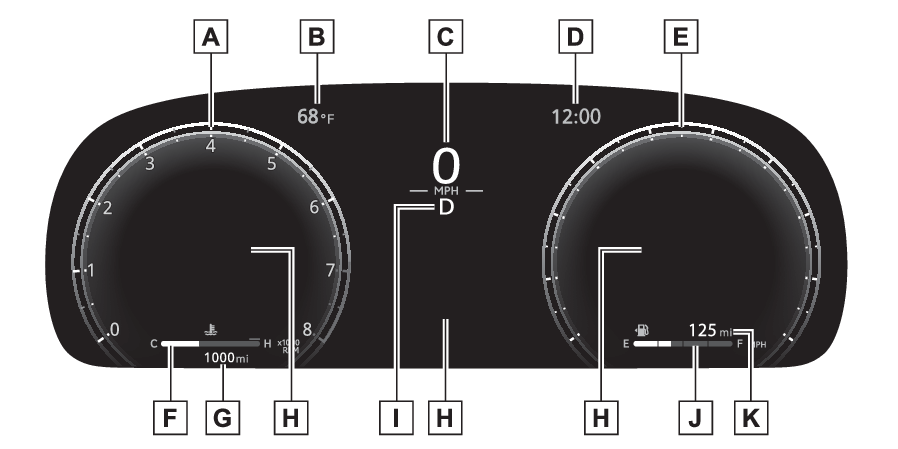
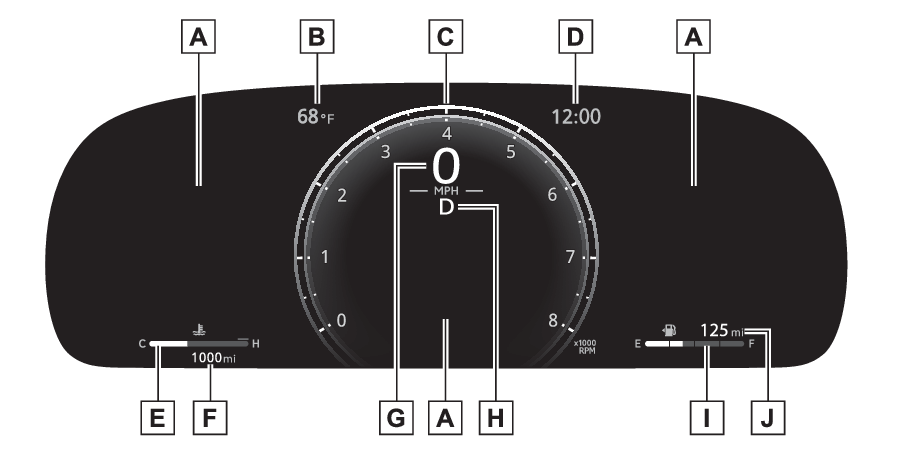
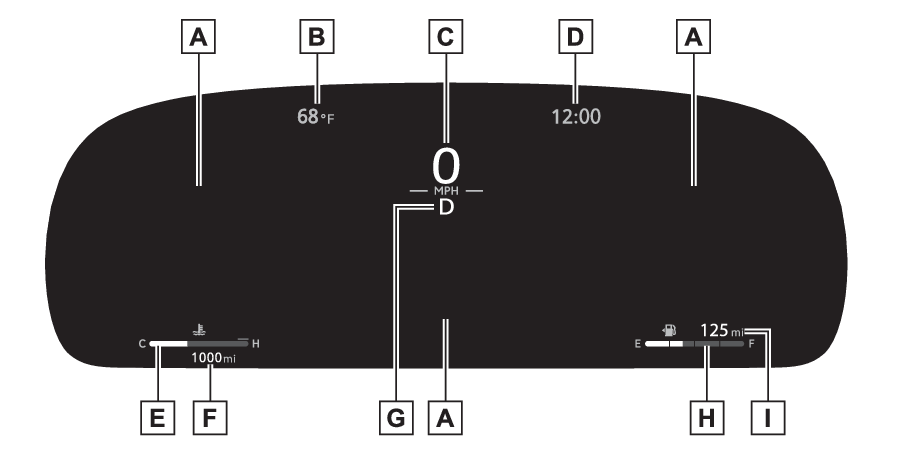
Fuel gaugeFuel gaugeLocations of gauges and meters2-dial typeThe units used on the meters may differ depending on the target region.TachometerDisplays the engine speed in revolutions per minuteOutside temperatureDisplays the outside temperature within the range of -40°F (-40°C) to 141°F (60°C)SpeedometerClock (Adjusting the clock)SpeedometerEngine coolant temperature gaugeDisplays the engine coolant temperatureOdometer and trip meter display (Odometer and trip meter display)Multi-information displayPresents the driver with a variety of vehicle data (Multi-information display (12.3-inch display))Displays warning messages if a malfunction occurs (If a warning message is displayed)Shift position and gear position indicator (Automatic transmission)Fuel gaugeDisplays the quantity of fuel remaining in the tankDriving rangeDisplays driving range with remaining fuel.1-dial displayThe units used on the meters may differ depending on the target region.Multi-information displayPresents the driver with a variety of vehicle data (Multi-information display (12.3-inch display))Displays warning messages if a malfunction occurs (If a warning message is displayed)Outside temperatureDisplays the outside temperature within the range of -40°F (-40°C) to 141°F (60°C)Speedometer/TachometerTachometer: Displays the engine speed in revolutions per minuteThis setting can be changed on the setting screen. (Settings)Clock (Adjusting the clock)Engine coolant temperature gaugeDisplays the engine coolant temperatureOdometer and trip meter display (Odometer and trip meter display)SpeedometerShift position and gear position indicator (Automatic transmission)Fuel gaugeDisplays the quantity of fuel remaining in the tankDriving rangeDisplays driving range with remaining fuel.Non-dial displayThe units used on the meters may differ depending on the target region.Multi-information displayPresents the driver with a variety of vehicle data (Multi-information display (12.3-inch display))Displays warning messages if a malfunction occurs (If a warning message is displayed)Outside temperatureDisplays the outside temperature within the range of -40°F (-40°C) to 141°F (60°C)SpeedometerClock (Adjusting the clock)Engine coolant temperature gaugeDisplays the engine coolant temperatureOdometer and trip meter display (Odometer and trip meter display)Shift position indicator and gear position indicator (Automatic transmission)Fuel gaugeDisplays the quantity of fuel remaining in the tankDriving rangeDisplays driving range with remaining fuel.Note:Outside temperature displayIn the following situations, the correct outside temperature may not be displayed,
or the display may take longer than normal to change:When stopped, or driving at low speeds (less than 12 mph [20 km/h])When the outside temperature has changed suddenly (at the entrance/exit of a garage,
tunnel, etc.)When “--” or “E” is displayed, the system may be malfunctioning. Take your vehicle
to your Toyota dealer.Driving rangeUse the displayed values as a reference only.This distance is computed based on your average fuel consumption. As a result, the
actual distance that can be driven may differ from that displayed.When only a small amount of fuel is added to the tank, the display may not be updated.
When refueling, turn the engine switch off. If the vehicle is refueled without turning
the engine switch off, the display may not be updated.Liquid crystal displayLiquid crystal displayFree/Open Source Software InformationThis product contains Free/Open Source Software (FOSS). The license information and/or
the source code of such FOSS can be found at the following URL.https://www.denso.com/global/en/opensource/meter/toyota/CustomizationThe gauges and meters can be customized in
of the multi-information display. (Settings)Warning:The information display at low temperaturesAllow the interior of the vehicle to warm up before using the liquid crystal information
display. At extremely low temperatures, the information display monitor may respond
slowly, and display changes may be delayed.For example, there is a lag between the driver’s shifting and the new gear number
appearing on the display. This lag could cause the driver to downshift again, causing
rapid and excessive engine braking and possibly an accident resulting in death or
injury.Notice:To prevent damage to the engine and its componentsDo not let the indicator needle of the tachometer enter the red zone, which indicates
the maximum engine speed.The engine may be overheating if the engine coolant temperature gauge is in the red
zone (H). In this case, immediately stop the vehicle in a safe place, and check the
engine after it has cooled completely. (If your vehicle overheats)OdometerTrip metersOdometer and trip meter displayOdometer and trip meter display
Display itemsDisplay itemsOdometerDisplays the total distance the vehicle has been driven.Trip meter A/Trip meter BDisplays the distance the vehicle has been driven since the meter was last reset.
Trip meters A and B can be used to record and display different distances independently.Distance until next engine oil changeDisplays the distance the vehicle can be driven until an oil change is necessary.Switches
“ODO” switch“ODO” switchOdometer and trip meter display
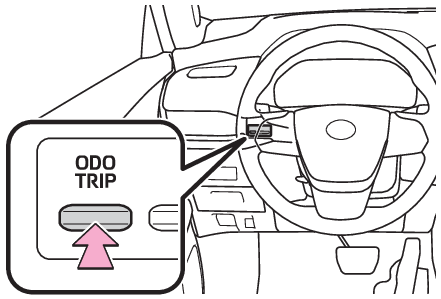
“ODO” switchChanging the displayEach time the “ODO TRIP” switch is pressed, the displayed item will be changed. When
the trip meter is displayed, pressing and holding the switch will reset the trip meter.Switches
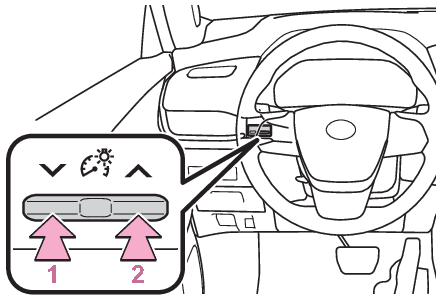
Instrument panel light control switchesMeter
Instrument panel light controlInstrument panel light controlBrightness control
Instrument panel light controlChanging the instrument panel light brightnessThe brightness of the instrument panel lights can be adjusted.DarkerBrighterNote:Brightness of the meters (day mode and night mode)The brightness of the meters is changed between day mode and night mode.Day mode: When the tail lights are offNight mode: When the tail lights are on and the surrounding area is darkWhen the tail lights are on but the surrounding area is bright, any adjustments made
to the meter brightness levels will be applied to both modes at once.Multi-information display
ClockClockAdjusting the clockThe clocks can be adjusted on the multimedia display.Refer to the “MULTIMEDIA OWNER’S MANUAL”.