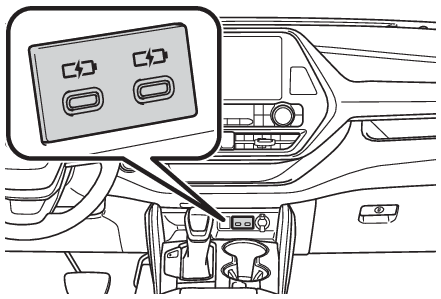
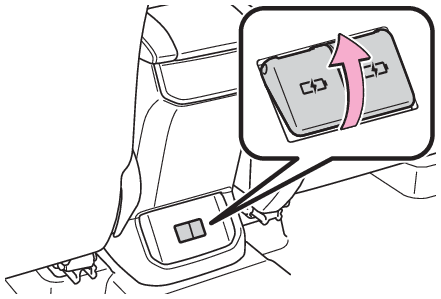
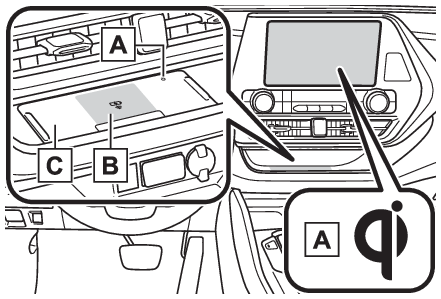
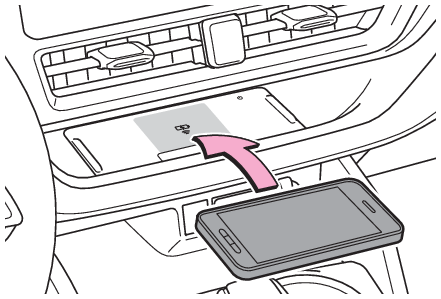
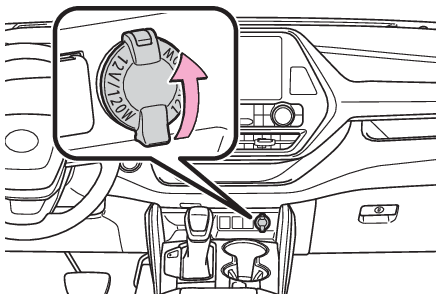
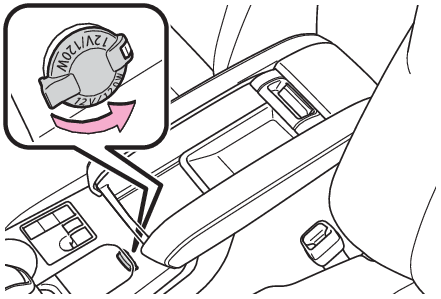
Other interior features USB charging portsUSB charging ports The USB charging ports are used to supply 3 A of electricity at 5 V to external devices.The USB charging ports are for charging only. They are not designed for data transfer or other purposes.Depending on the external device, it may not charge properly. Refer to the manual included with the device before using a USB charging port. Using the USB charging ports On the instrument panel Rear of console box Open the lid. Note: The USB charging ports can be used when The engine switch is in ACC or ON. Situations in which the USB charging ports may not operate correctly If a device which consumes more than 3 A at 5 V is connected If a device designed to communicate with a personal computer, such as a USB memory device, is connected If the connected external device is turned off (depending on device) If the temperature inside the vehicle is high, such as after the vehicle has been parked in the sun About connected external devices Depending on the connected external device, charging may occasionally be suspended and then start again. This is not a malfunction. Notice: To prevent damage to the USB charging ports Do not insert foreign objects into the ports. Do not spill water or other liquids into the ports. When the USB charging ports are not in use, close the lids. If a foreign object or liquid enters a port may cause a short circuit. Do not apply excessive force to or impact the USB charging ports. Do not disassemble or modify the USB charging ports. To prevent damage to external devices Do not leave external devices in the vehicle. The temperature inside the vehicle may become high, resulting in damage to an external device. Do not push down on or apply unnecessary force to an external device or the cable of an external device while it is connected. To prevent battery discharge Do not use the USB charging ports for a long period of time with the engine stopped. Wireless chargerWireless charger (if equipped) A portable device, such as a smartphone or mobile battery, can be charged by just placing it on the charging area, provided the device is compatible with the Qi wireless charging standard created by the Wireless Power Consortium. The wireless charger cannot be used with a portable device that is larger than the charging area. Additionally, depending on the portable device, the wireless charger may not operate properly. Refer to the operation manual of the portable device. The “Qi” symbol The “Qi” symbol is a trademark of the Wireless Power Consortium. Name for all parts Operation indicator light Charge area Charging tray Using the wireless charger Place a portable device on the charging area with its charging surface facing down. Depending on the portable device, its charging coil may not be in the center of the device. In this case, place the portable device so that its charging coil is centered in the charging area. While charging, the operation indicator light (orange) will be illuminated. If charging does not begin, move the portable device as close to the center of the charging area as possible. If charging is not performed, the operation indicator light will slowly illuminate in green and orange alternatively and a sound of charging coil operation may be heard repeatedly. When charging is complete, the operation indicator light (green) will illuminate. Rapid charging function The following portable devices support rapid charging. Portable devices compliant with WPC Ver1.2.4 and compatible with rapid charging iPhone’s with an iOS version that supports 7.5 W charging (iPhone 8 and later models) When a portable device that supports rapid charging is charged, charging automatically switches to the rapid charging function. Recharging function If a certain amount of time has elapsed since charging completed and the portable device has not been moved, the wireless charger will restart charging. If a portable device is moved significantly within the charging area, the charging coil may disconnect and charging may temporarily be stopped. However, if a charging coil is detected within the charging area, the charging coil inside the wireless charger will move near the other coil and charging will resume. Operation indicator light status
Operation indicator light State
Charging tray Center display
Off Off The wireless charger is off
Green (illuminated) Gray Standby (charging is possible)
Charging is complete*
Orange (illuminated) Blue A portable device has been placed on the charging area (identifying the portable device)
Charging in progress
*Depending on the portable device, the operation indicator light may stay illuminated (orange) after charging has completed.
The wireless charger is not working properly. The followings are situations in which the wireless charger does not work properly and how to deal with the possible causes.
Operation indicator light Suspected causes/Handling method
Charging tray Center display
Orange (Flashing repeatedly once every second) Gray Vehicle to wireless charger communication failure →If the engine is running, stop and then restart the engine. If the engine switch is in ACC, start the engine.
Green (Flashing repeatedly once every second) Disappear Wireless charger and multimedia system communication failure →If the engine is running, stop and then restart the engine. If the engine switch is in ACC, start the engine. If the engine switch is in ACC, start the engine.
Green (illuminates) Blue AM radio stations are being automatically selected →Wait until the system has completed the automatic selection of AM radio stations. In the case that automatic selection cannot be completed, stop automatic selection.
The smart key system is detecting the key →Please wait until the key detection is complete.
Orange (Repeatedly flashes 3 times continuously) Gray Foreign substance detection: A metallic foreign substance is in the charge area, and so the abnormal heating prevention function of the charging coil operated →Remove the foreign substance from the charge area.
Portable device misaligned: →The charging coil in the portable device moved outside of the charge area, and so the abnormal heating prevention function of the charging coil operated
Orange (Repeatedly flashes 4 times continuously) Gray Safety shutdown resulting when the temperature within the wireless charger exceeded the set value →Stop charging, remove the portable device from the charging tray, wait for the temperature to drop, and then start charging again.
Note: The wireless charger can be operated when The engine switch is in ACC or ON. Portable devices that can be charged Portable devices compatible with the Qi wireless charging standard can be charged by the wireless charger. However, compatibility with all devices which meet the Qi wireless charging standard is not guaranteed. The wireless charger is designed to supply low power electricity (5 W or less) to a cellular phone, smartphone, or other portable device. Failure to do so may result in the possibility of fire, However, portable devices, such as the following, can be charged with more than 5 W. 7.5 W charging compatible iPhones can be charged at 7.5 W or less. Portable devices which conform to WPC Ver 1.2.4 (Extended Power profile ) can be charged at 10 W or less. If a cover or accessory is attached to the portable device Do not charge a portable device if a cover or accessory which is not Qi compatible is attached. Depending on the type of cover (including for certain genuine manufacturer parts) and/or accessory attached, it may not be possible to charge the portable device. If the portable device is placed on the charging area and does not charge, remove the cover and/or accessories. AM radio cooperation function during charging When noise enters the AM radio during charging, charging frequency will be automatically changed to reduce noise. While the AM radio automatic tuning, charging is temporarily stopped in order to prevent tuning error due to noise caused by charging. When tuning is finished, charging will be automatically resumed. Charging precautions If the electronic key cannot be detected in the cabin, charging cannot be performed. When a door is opened and closed, charging may be temporarily suspended. While charging, the wireless charger and the portable device will become warm. This is not a malfunction. If a portable device becomes warm while charging and charging stops due to the protection function of the portable device, wait until the portable device cools down and charge it again.The fan may start operating to lower the temperature inside the wireless charger, however this is not a malfunction. Sound generated during operation When the power supply switch is turned on or while a portable device is being identified, operation sounds may be heard. This is not a malfunction. Cleaning the wireless charger Cleaning and protecting the vehicle interior Warning: Caution while driving When charging a portable device, for safety reasons, the driver should not operate the main part of the portable device while driving. Caution while in motion Do not charge lightweight devices such as wireless headphones while in motion. These devices are very light and may be ejected from the charging tray, which may lead to unforeseen accidents. Caution regarding interference with electronic devices People with implantable cardiac pacemakers, cardiac resynchronization therapy pacemakers or implantable cardioverter defibrillators, as well as any other electrical medical device, should consult their physician about the usage of the wireless charger. To prevent malfunctions or burns Observe the following precautions. Failure to do so may result in an equipment failure and damage, catch fire, burns due to overheat or electric shock. Do not insert any metallic objects between the charging area and the portable device while charging. Do not attach an aluminum sticker or other metallic objects to the charge area. Do not attach an aluminum sticker or other metallic objects to the side of the portable device (or to its case or cover) that touches the charge area. Do not use the charging tray as a small storage space. Do not subject to a strong force or impact. Do not disassemble, modify or remove the wireless charger. Do not charge devices other than specified portable devices. Keep away from magnetic items. Do not charge devices if the charge area is covered in dust. Do not cover with a cloth or similar material. Notice: Situations in which the function may not operate normally Devices may not be charged normally in the following situations. The portable device is fully charged The portable device is being charged with a cable connected There is foreign matter between the charge area and portable device Charging has caused the portable device to heat up The temperature around the charging tray is 95°F (35°C) or higher, such as in extreme heat The portable device is placed with its charging side facing up The portable device is placed in an area misaligned from the charge area The portable device is larger than the charging tray A foldable and portable device is placed outside the charge area The camera lens protrudes 0.12 in. (3 mm) or more from the surface of the portal device The vehicle is in an area where strong electrical waves or noise are emitted, such as near a television tower, power plant, gasoline station, broadcasting station, large display, airport, etc. Any of the following objects that is protrudes 0.12 in. (3 mm) or thicker is stuck or installed between the charging side of the portable device and the charge area. Thick cases or covers A case or cover attached with an uneven or tilted surface, so that the charging side is not flat Thick decorations Accessories, such as fingerrings, straps, etc. When the portable device is in contact with, or is covered by any of the following metallic objects: A card that has metal on it, such as aluminum foil, etc. A pack of cigarettes that includes aluminum foil A wallet or bag that is made of metal Coins A heating pad CDs, DVDs or other media A metal accessory A case or cover made of metal Electric wave type wireless remote controls are being used nearby The electronic key is not inside the vehicle 2 or more portable devices are placed on the charging tray at the same time If charging is abnormal or the operation indicator light continues to flash for any other reason, the wireless charger may be malfunctioning. Contact your Toyota dealer. To prevent malfunctions and data corruptions When charging, bringing a credit, or other magnetic card, or magnetic storage media close to the charge area may clear any stored data due to magnetic influence. Also, do not bring a wristwatch or other precision instrument close to the charge area since doing so may cause it to malfunction. Do not charge with a non-contact IC card such as a transportation system IC card inserted between the charging side of a portable device and the charge area. The IC chip may becomeextremely hot and damage the portable device or IC card. Be especially careful not to charge a portable device inside a case or cover with a non-contact IC card attached. Do not leave portable devices inside the vehicle. The inside of the vehicle can become hot in extreme heat, which could cause a malfunction. If the smartphone OS has been updated If the smartphone OS has been updated to a newer version, its charging specifications may have changed significantly.For details, check the information on the manufacturer’s website. To prevent battery discharge Do not use the wireless charger for a long period of time with the engine is stopped.
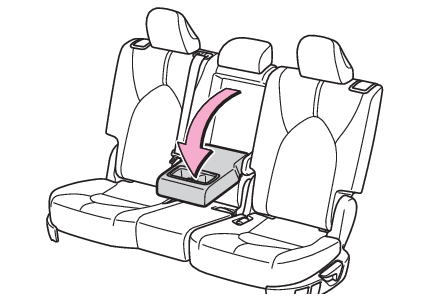
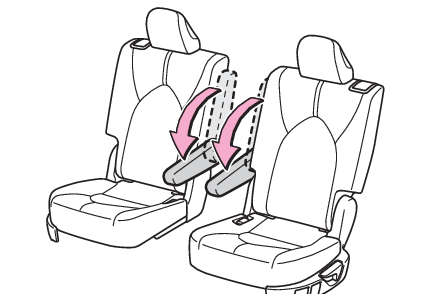
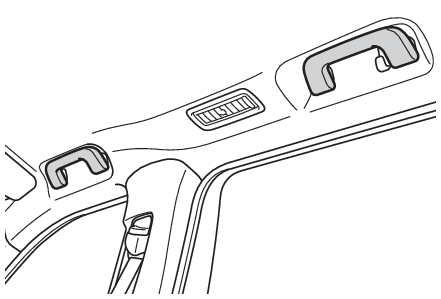
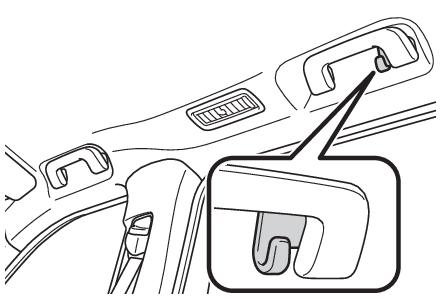
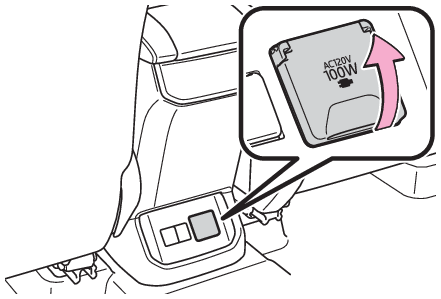
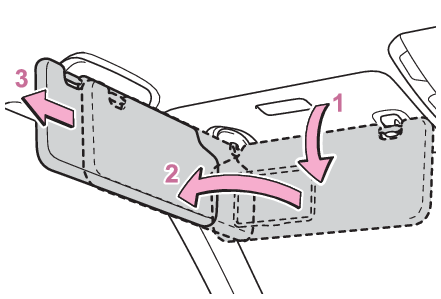
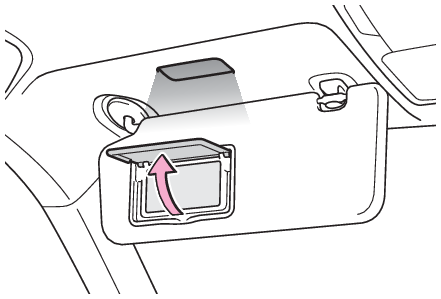
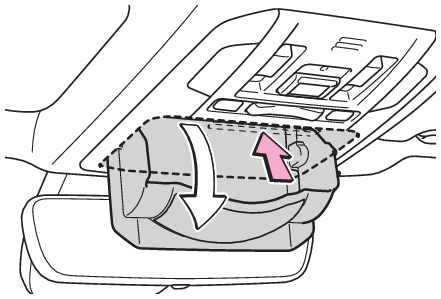
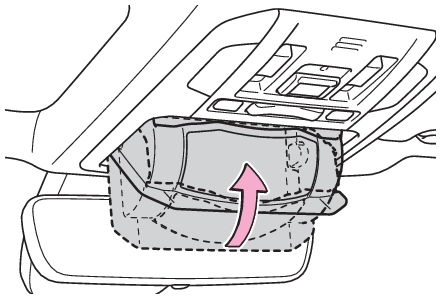
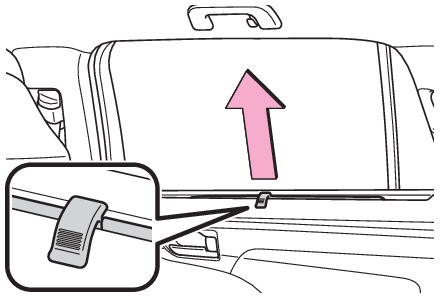
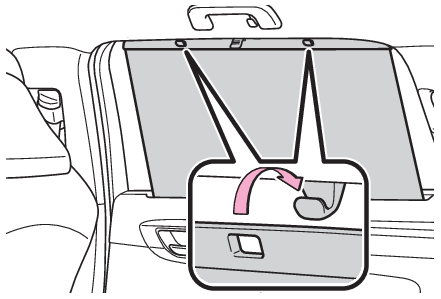
ArmrestArmrest Second seats (8-seat models) Pull the armrest down for use. Second seats (7-seat models) Pull the armrest down for use. Notice: To prevent damage to the armrest Do not apply too much load on the armrest. Assist gripsAssist grips An assist grip installed on the ceiling can be used to support your body while sitting on the seat. Warning: Assist grip Do not use the assist grip when getting in or out of the vehicle or rising from your seat. Notice: To prevent damage to the assist grip Do not hang any heavy object or put a heavy load on the assist grip. Hooks Coat hooks Coat hooksCoat hooks The coat hooks are provided with the rear assist grips. Warning: Items that must not be hung on the hook Do not hang coat hangers or other hard or sharp objects on the hook. If the SRS curtain shield airbags deploy, these items may become projectiles, causing death or serious injury. Power outletsPower outlets 12 V Please use as a power supply for electronic goods that use less than 12 VDC/10 A (power consumption of 120 W). When using electronic goods, make sure that the power consumption of all the connected power outlets is less than 120 W. On the instrument panel Open the lid. Inside the console box Open the lid. 120 VAC (if equipped) Accessories that use less than 100 W. Open the lid. Note: The power outlet can be used when 12 V The engine switch is in ACC or ON. 120 VAC (if equipped) The engine switch is in ON. Using the power outlet (vehicles with Stop & Start system) When the engine restarts after having been stopped by the Stop & Start system, the power outlets may be temporarily unusable, but this is not a malfunction. When turning the engine switch off Disconnect electrical devices with charging functions, such as mobile battery packs.If such devices are left connected, the engine switch may not be turned off normally. Notice: To avoid damaging the power outlet Close the power outlet lid when the power outlet is not in use. Foreign objects or liquids that enter the power outlet may cause a short circuit. To prevent the battery from being discharged Do not use the power outlet longer than necessary when the engine is not running. Appliances that may not operate properly (120 VAC) The following 120 VAC appliances may not operate properly even if their power consumption is under 100 W. Appliances with high initial peak wattage Measuring devices that process precise data Other appliances that require an extremely stable power supply Sun visorsSun visors To set the visor in the forward position, flip it down. To set the visor in the side position, flip down, unhook, and swing it to the side. To use the side extender, place the visor in the side position, then slide it backward. Vanity mirrors Vanity lights Mirrors Vanity mirrors Lights Vanity lights Vanity mirrors Open the cover. The light turns on when the cover is opened. Note: To prevent battery discharge If the vanity lights remain on when the engine switch is turned off, the lights will go off automatically after 20 minutes. Notice: To prevent the battery from being discharged Do not leave the vanity lights on for extended periods while the engine is off. Conversation mirrorConversation mirror Push the lid. Push the lid back up half way. Note: To use the overhead console from the conversation mirror state Fully close the lid, then open it again. (Auxiliary boxes) Rear door sunshadesRear door sunshades (if equipped) Pull the tab up. Hook the sunshade on to the anchors. To lower the sunshade, pull the tab up slightly to unhook the shade from the anchors, and lower it slowly. Notice: To ensure normal operation of the sunshades Do not put anything in an area where it may interfere with the operation of a rear door sunshade. To prevent damage to the rear door sunshades, do not apply excessive load or attach items to the rear door sunshades.