Transmission
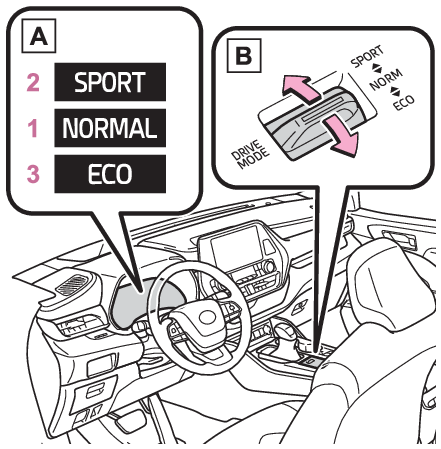
Driving mode select switchSwitches
Driving mode select switchSport modeEco drive modeDriving mode select switchDriving
Driving mode select switchDriving mode select switchThe driving modes can be selected to suit the driving and usage conditions.Normal modeSelecting a driving modeMulti-information displayDriving mode select switchOperate the driving mode select switch forward or backward to select the desired driving
mode on the multi-information display.Normal modeProvides an optimal balance of fuel economy, quietness, and dynamic performance. Suitable
for normal driving.Sport modeControls the transmission and engine to provide quick, powerful acceleration. This
mode also changes the steering feel, making it suitable for when agile driving response
is desired, such as when driving on roads with many curves.When Sport mode is selected, Sport mode indicator comes on.Eco drive modeHelps the driver accelerate in an eco-friendly manner and improve fuel economy through
moderate throttle characteristics and by controlling the operation of the air conditioning
system (heating/cooling).When Eco drive mode is selected, Eco drive mode indicator comes on.Note:When changing to a driving mode other than normal modeSwitches to AWD control suitable for the selected mode. (for Dynamic Torque Vectoring
AWD vehicles only)Air conditioning system operation in Eco drive modeIn Eco drive mode, heating/cooling operations and the fan speed is controlled to improve
fuel efficiency. Perform the following procedures to increase the air conditioning
performance.Vehicle with 12.3-inch audio system screen: Turn eco air conditioning mode off (Eco air conditioning mode)Adjust the fan speed (Setting the fan speed)Cancel Eco drive modeCanceling a driving modeSport mode is automatically canceled and the driving mode returns to normal mode when
the engine switch is turned off.Normal mode and Eco drive mode are not canceled until another driving mode is selected.
(Even if the engine switch is turned off, normal mode and Eco drive mode will not
be automatically canceled.)