Head-up displayDisplay
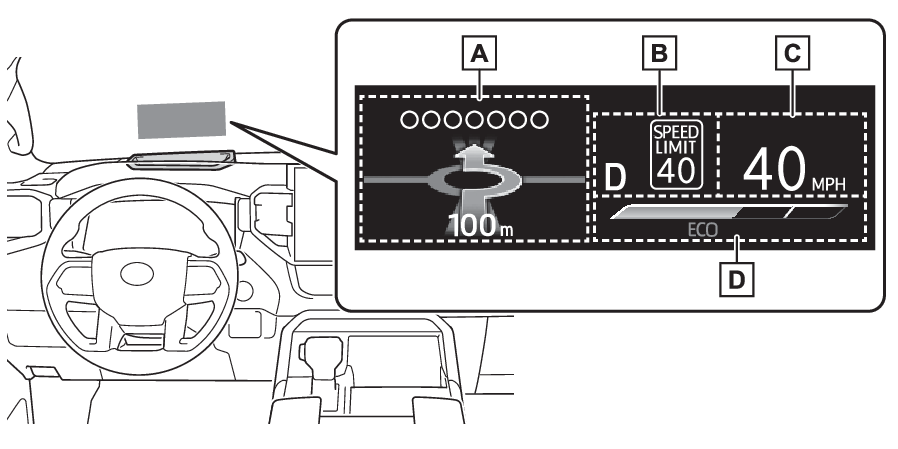
Head-up displayHead-up display**If equippedThe head-up display projects a variety of driving-related information and the operating
state of the driving support systems on the windshield.Navigation system-linked displayHead-up display
Outside temperatureSystem componentsIllustrations used in this text are intended as examples, and may differ from the
image that is actually displayed by the head-up display.Driving support system status (if equipped)/navigation system-linked display area
(Driving support system status/navigation system-linked display area)Shift position display/RSA (Road Sign Assist) display area (if equipped) (Shift position purpose and functions, RSA (Road Sign Assist)*)Vehicle speed displayEco Driving Indicator/Outside temperature display area (Eco Driving Indicator/Outside temperature display)Note:Head-up display will operate whenThe engine switch is in ON.When using the head-up displayThe head-up display may seem dark or hard to see when viewed through sunglasses, especially
polarized sunglasses. Adjust the brightness of the head-up display or remove your
sunglasses.Street name displayOnly street names which are included in the map data will be displayed.Warning:When using the head-up displayCheck that the position and brightness of the head-up display image does not interfere
with safe driving. Incorrect adjustment of the image’s position or brightness may
obstruct the driver’s view and lead to an accident, resulting in death or serious
injury.Do not continuously look at the head-up display while driving as you may fail to see
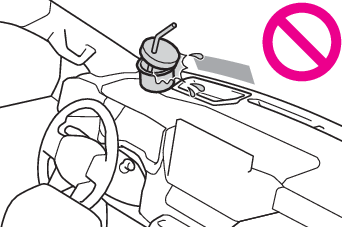
pedestrians, objects on the road, etc., ahead of the vehicle.Notice:Head-up display projectorDo not place any drinks near the head-up display projector. If the projector gets
wet, electrical malfunctions may result.Do not place anything on or put stickers onto the head-up display projector.Doing
so could interrupt head-up display indications.Do not touch the inside of the head-up display projector or thrust sharp edges or
the like into the projector.Doing so could cause mechanical malfunctions.Using the head-up displaySelect
on the multi-information display (Head-up Display*) and then “
HUD Main”.Switches
HUD (Head-up display) switchHead-up display
HUD (Head-up display) switchHUD (Head-up display) switchEnabling/disabling the head-up displayPress the
meter control switch to enable/disable the head-up display.Head-up display
SettingsChanging the head-up display settingsPress and hold the
meter control switch to change the following settings:Brightness and vertical position of the head-up displaySelect to adjust the brightness or vertical position of the head-up display.Display contentSelect to change the display between the following:No contentEco Driving IndicatorSelect to enable/disable the following items:Route guidance to destinationDriving support system display (if equipped)Compass (heading-up display)Audio system operation statusDisplay angleSelect to adjust the angle of the head-up display.Note:Enabling/disabling of the head-up displayIf the head-up display is disabled, it will remain disabled when the engine switch
is turned off then back to ON.Display brightnessThe brightness of the head-up display can be adjusted on
of the multi-information display. Also, it is automatically adjusted according to
the ambient brightness.Warning:Caution for changing settings of the head-up displayIf the engine is running when changing the display settings, ensure that the vehicle
is parked in a place with adequate ventilation. In a closed area such as a garage,
exhaust gases including harmful carbon monoxide (CO) may collect and enter the vehicle.
This may lead to death or a serious health hazard.Notice:When changing the settings of the head-up displayTo prevent battery discharge, ensure that the engine is running while changing the
settings of the head-up display.Head-up display
Driving support system display areaHead-up display
Navigation system-linked display areaDriving support system status/navigation system-linked display areaDriving support system status displayDisplays the operational status of the following systems:LTA (Lane Tracing Assist) (if equipped) (LTA (Lane Tracing Assist)*)Dynamic radar cruise control with full-speed range (if equipped) (Dynamic radar cruise control with full-speed range*)Details of content displayed on the head-up display may differ from that displayed
on the multi-information display. For details, refer to the explanation of each system.Navigation system-linked display areaDisplays the following items which are linked to the navigation system:Street nameRoute guidance to destinationCompass (heading-up display)Head-up display
Pop-up displayPop-up displayPop-up displays for the following systems will be displayed when necessary:Driving support systemsDisplays a warning/suggestion/advice message or the operating state of a relevant
system.PCS (Pre-Collision System) (if equipped) (PCS (Pre-Collision System)*)LTA (Lane Tracing Assist) (if equipped) (LTA (Lane Tracing Assist)*)PKSB (Parking Support Brake) (if equipped) (PKSB (Parking Support Brake)*)Brake Override System (Restraining the engine output (Brake Override System))Drive-Start Control (Sudden start restraint control (Drive-Start Control [DSC]))Details of content displayed on the head-up display may differ from that displayed
on the multi-information display. For details, refer to the explanation of each system./
iconsThese icons are linked to the multi-information display: Master warning iconDisplayed when a warning message is displayed on the multi-information display. (If a warning message is displayed): Information iconDisplayed when an advice pop-up display is displayed on the multi-information display.Warning messageSome warning messages are displayed when necessary, according to certain conditions.Details of content displayed on the head-up display may differ from that displayed
on the multi-information display.Audio system operation statusDisplayed when an audio remote control switch on the steering wheel is operated.Hands-free system statusDisplayed when the hands-free system is operated.Note:When a pop-up display is displayedWhen a pop-up display is displayed, a current display may no longer be displayed.
In this case, the display will return after the pop-up display disappears.Eco Driving Indicator/Outside temperature displayHead-up display
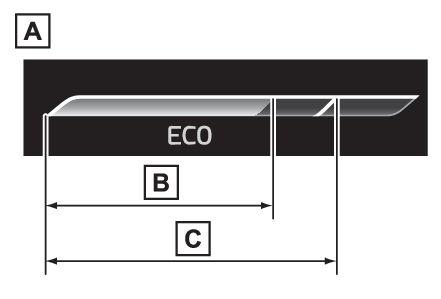
Eco Driving IndicatorEco Driving IndicatorEco Driving IndicatorEco Driving Indicator Zone DisplayEco driving ratio based on accelerationZone of Eco drivingDisplayed content is the same as that displayed on the multi-information display (Eco
Driving Indicator). For details, refer to Eco Driving Indicator/Distance to empty.Outside temperatureOutside temperature displayDisplayed when the engine switch is turned to ON or when the low outside temperature
indicator is flashing.Note:Outside temperature displayWhen the ambient temperature is approximately 37°F (3°C) or lower, the low outside
temperature indicator will flash for approximately 10 seconds and the outside temperature
display will turn off. In this case, the display will be displayed again when the
outside temperature becomes approximately 41°F (5°C) or higher.In the following situations, the correct outside temperature may not be displayed,
or the display may take longer than normal to change:When stopped, or driving at low speeds (less than 16 mph [25 km/h])When the outside temperature has changed suddenly (at the entrance/exit of a garage,
tunnel, etc.)When “
--” is displayed, the system may be malfunctioning. Take your vehicle to your Toyota
dealer.