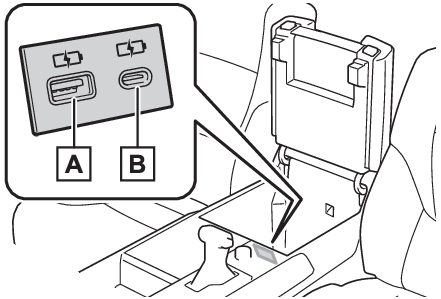
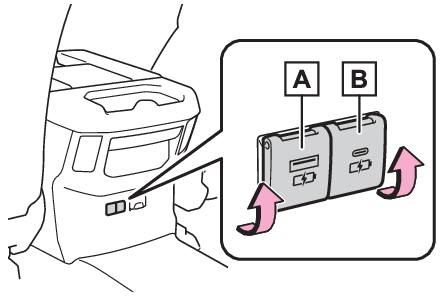
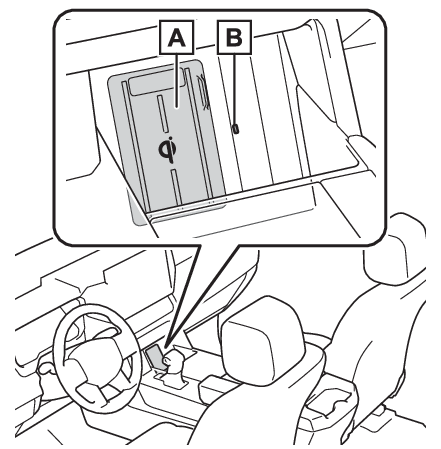
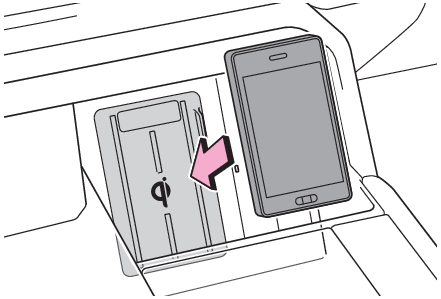
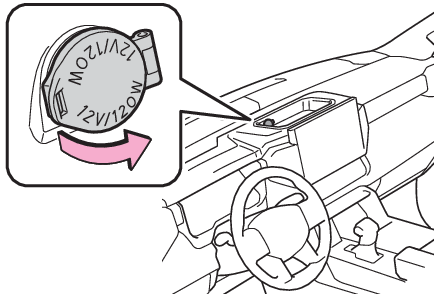
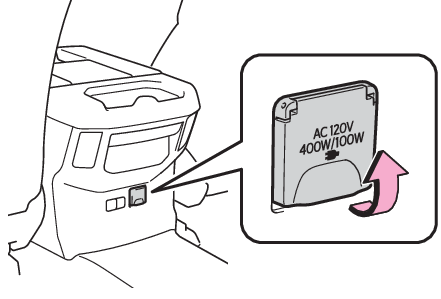
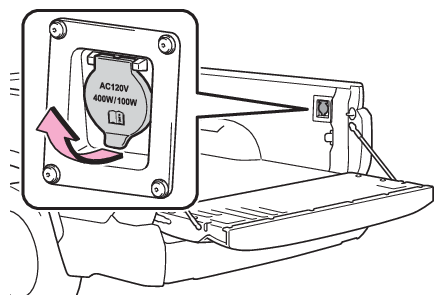
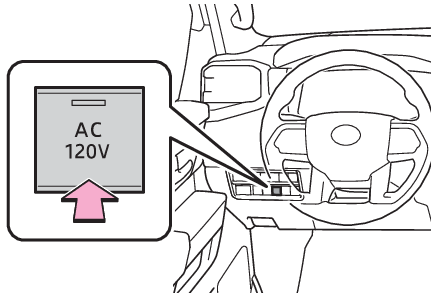
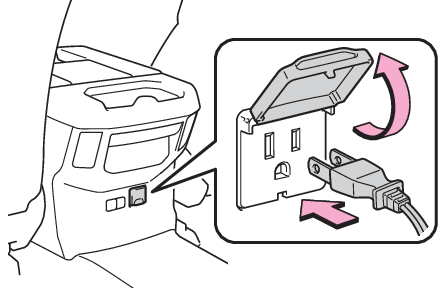
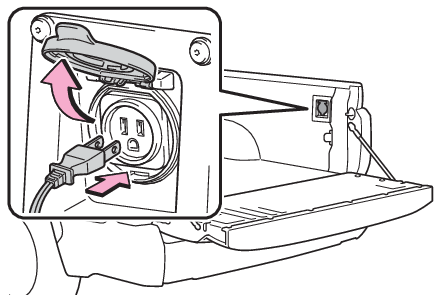
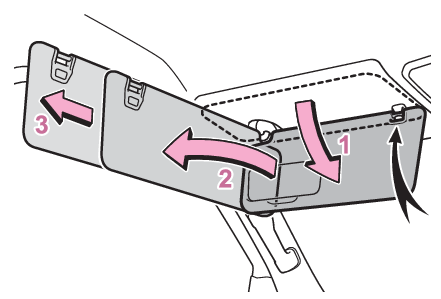
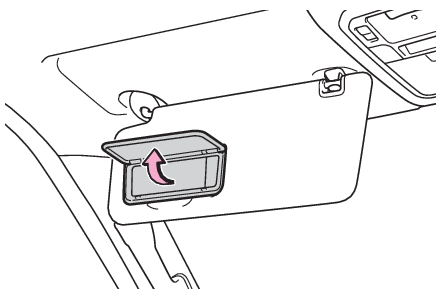
Other interior features USB charging portsUSB charging ports The USB charging ports are used to supply 2.5 A (USB Type-A) or 3.0 A (USB Type-C) of electricity at 5 V to external devices.Use the appropriate terminal for each charging port type.The USB charging ports are for charging only. They are not designed for data transfer or other purposes.Depending on the external device, it may not charge properly. Refer to the manual included with the device before using a USB charging port. Using the USB charging ports In the console box USB Type-A USB Type-C Rear of console box (if equipped) Open the lid. USB Type-A USB Type-C Note: The USB charging ports can be used when The engine switch is in ACC or ON. Situations in which the USB charging ports may not operate correctly USB Type-A: If a device which consumes more than 2.5 A at 5 V is connectedUSB Type-C: If a device which consumes more than 3.0 A at 5 V is connected If a device designed to communicate with a personal computer, such as a USB memory device, is connected If the connected external device is turned off (depending on device) If the temperature inside the vehicle is high, such as after the vehicle has been parked in the sun About connected external devices Depending on the connected external device, charging may occasionally be suspended and then start again. This is not a malfunction. Notice: To prevent damage to the USB charging ports Do not insert foreign objects into the ports. Do not spill water or other liquids into the ports. Rear of console box: When the USB charging ports are not in use, close the lids. If a foreign object or liquid enters a port may cause a short circuit. Do not apply excessive force to or impact the USB charging ports. Do not disassemble or modify the USB charging ports. To prevent damage to external devices Do not leave external devices in the vehicle. The temperature inside the vehicle may become high, resulting in damage to an external device. Do not push down on or apply unnecessary force to an external device or the cable of an external device while it is connected. To prevent battery discharge Do not use the USB charging ports for a long period of time with the engine stopped. Wireless chargerWireless charger (if equipped) A portable device can be charged by just placing Qi standard wireless charge compatible portable devices according to the Wireless Power Consortium, such as smartphones and mobile batteries, etc., on the charge area. This function cannot be used with portable devices that are larger than the charging area. Also, depending on the portable device, it may not operate as normal. Please read the operation manual for portable devices to be used. The “ Qi” symbol The “ Qi” symbol is a trademark of the Wireless Power Consortium. Name for all parts Charge area Operation indicator light Using the wireless charger Turn the engine switch to ACC or ON. When turned on, the operation indicator light (green) comes on. Place the charging side of the portable device down. When charging, the operation indicator light (orange) comes on. If charging is not occurring, try placing the portable device as close to the center of the charging area as possible. When charging is complete, the operation indicator light (green) comes on. Recharging function When charging is complete and after a fixed time in the charge suspension state, charging restarts. When the portable device is moved, charging is stopped for a moment and then it restarts. Lighting conditions of operation indicator light
Operation indicator light Conditions
Turning off When the Wireless charger power supply is off
Green (comes on) On Standby (charging possible state)
When charging is complete*
Orange (comes on) When placing the portable device on the charging area (detecting the portable device)
Charging
*Depending on the portable device, there are cases where the operation indicator light will continue being lit up orange even after the charging is complete. When the operation indicator light flashes When an error occurs, the operation indicator light flashes an orange color.Handle the error based on the following tables. Flashing repeatedly once every second (Orange)
Suspected causes Handling method
Vehicle to charger communication failure. Contact your Toyota dealer.
Repeatedly flashes 3 times continuously (Orange)
Suspected causes Handling method
A foreign substance is between the portable device and charge area. Remove the foreign substance from between portable device and the charge area.
The portable device is out of sync due to the device being shifted from the center of the charge area. Place the portable device near the center of the charge area.
Repeatedly flashes 4 times continuously (Orange)
Suspected causes Handling method
Temperature rising within the wireless charger. Stop charging at once and start charging again after a while.
Note: The wireless charger can be operated when The engine switch is in ACC or ON. Usable portable devices Qi standard wireless charge standard can be used on compatible devices. However, not all Qi standard devices and compatibility are guaranteed. Starting with mobile phones and smartphones, it is aimed for low power electrically supplied portable devices of no more than 5W. When covers and accessories are attached to portable devices Do not charge in situations where cover and accessories not able to handle Qi are attached to the portable device. Depending on the type of cover and accessory, it may not be possible to charge. When charging is not performed even with the portable device placed on the charge area, remove the cover and accessories. Important points of the wireless charger If the electronic key cannot be detected within the vehicle interior, charging cannot be done. When the door is opened and closed, charging may be temporarily suspended. When charging, the wireless charging device and portable device will get warmer, however this is not a malfunction.When a portable device gets warm while charging, charging may stop due to the protection function on the portable device side. In this case, when the temperature of the portable device drops significantly, charge again. Operation sounds When the power supply is turned on, while searching for the portable device a sound will be produced, however this is not a malfunction. Certification Wireless chargerUsage of data collected through Safety Connect (U.S.mainland only) Warning: Caution while driving When charging a portable device, for safety reasons, the driver should not operate the main part of the portable device while driving. Caution regarding interference with electronic devices People with implantable cardiac pacemakers, cardiac resynchronization therapy-pacemakers or implantable cardioverter defibrillators, as well as any other electrical medical device, should consult their physician about the usage of the wireless charger. The operations of the wireless charger may have an affect on medical devices. To prevent damage or burns Observe the following precautions.Failure to do so may result in a possibility of equipment failure and damage, catch fire, burns due to overheat. Do not insert any metallic objects between the charging area and the portable device while charging Do not attach stickers, metallic objects, etc., to the charger area or portable device Do not cover with cloth, etc., and charge Do not charge portable devices other than designated Do not attempt to dismantle for disassembly or modifications Do not hit or apply a strong force Notice: Conditions in which the function may not operate correctly In the following conditions, it may not operate correctly The portable device is fully charged There is foreign matter between the charge area and portable device The temperature of the portable device gets higher from charging The charging surface of the portable device is facing up The placement of the portable device is out of alignment with the charge area Near a TV tower, electric power plant, gas station, radio station, large display, airport or other facility that generates strong radio waves or electrical noise When the portable device is in contact with, or is covered by the following metallic objects Cards to which aluminum foil is attached Cigarette boxes that have aluminum foil inside Metallic wallets or bags Coins Hand warmers made of metal Media such as CDs and DVDs When other wireless keys (that emit radio waves) are being used nearby In addition, excluding the above-mentioned, when the charger does not perform normally or the operation display lamp is flashing continuously, it is considered that the wireless charger is malfunctioning. Contact authorized Toyota dealer. To prevent failure or damage to data Do not bring magnetic cards, such as credit cards, or magnetic recording media, etc., close to the charger while charging, otherwise, data may disappear under the influence of magnetism. Also, do not bring precision instruments such as wrist watches, etc., close to the charger, as such objects may break. Do not leave portable devices in the cabin. The temperature inside the cabin may become high, when under the sun, and cause damage to the device. To prevent battery discharge When the engine is stopped, do not use the wireless charger for a long time.
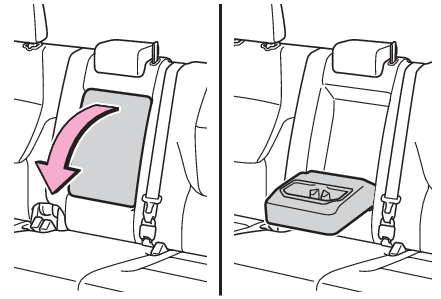
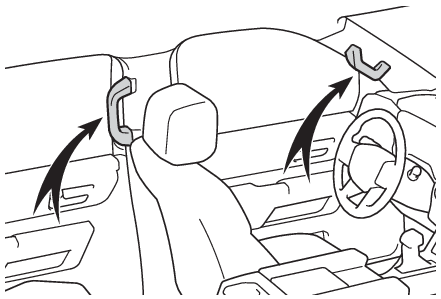
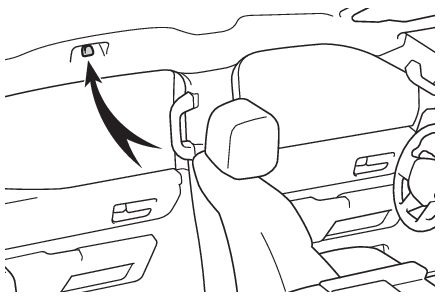
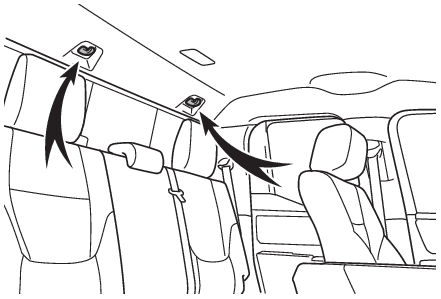
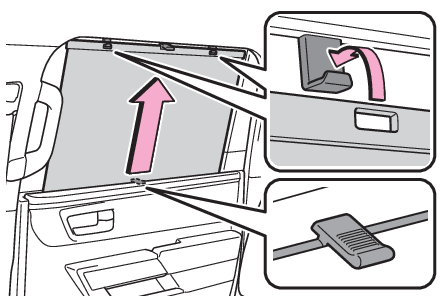
ArmrestArmrest (if equipped) Pull the armrest down for use. Notice: To prevent damage to the armrest Do not place too much strain on the armrest. Assist gripsAssist grips An assist grip installed on the pillar can be used when getting in or out of the vehicle and others. Notice: To prevent damage to the assist grip Do not hang any heavy object or put a heavy load on the assist grip. Hooks Coat hooks Coat hooksCoat hooks Type A Type B Warning: Items that must not be hung on the hook Do not hang a coat hanger or other hard or sharp object on the hook. If the SRS curtain shield airbags deploy, these items may become projectiles that cause death or serious injury. Power outletPower outlet (12 VDC) The power outlet can be used for 12 V accessories that run on less than 10 A. Open the lid. Note: The power outlet can be used when The engine switch is in ACC or ON. When turning the engine switch off Disconnect electrical devices with charging functions, such as mobile battery packs. If such devices are left connected, the engine switch may not be turned off normally. Notice: To avoid damaging the power outlet Close the power outlet lid when the power outlet is not in use. Foreign objects or liquids that enter the power outlet may cause a short circuit. To prevent the fuse from being blown Do not use an accessory that uses more than 12 V 10 A. To prevent battery discharge Do not use the power outlet longer than necessary when the engine is not running. Power outletPower outlets (120 VAC) (if equipped) Please use as a power supply for electronic devices that use less than 120 VAC. Using the power outlets Rear of the console box Open the lid. Bed Open the lid. When turning the power outlets on Press the “ AC120V” switch. The power outlets can be used when the indicator on the “ AC120V” switch is illuminated. The power outlets are turned off/on each time the “ AC120V” switch is pressed. Maximum available capacity of the power outlet While the vehicle is being driven The maximum capacity of the power outlet is always 120 V AC/100 W. When the vehicle is stationary The maximum capacity is restricted to 120 V AC/100 W when the shift lever is moved to any positions other than P or N. The maximum capacity is 120 V AC/400 W when the shift lever is in P or N. The maximum capacity of 400 W can only be restored by turning the power outlet main switch off and then on again under condition described above. When connecting a device Open the lid, and fully and securely insert the plug of the device into the power outlet. Rear of the console box Bed When turning the power outlets off Turn the connected devices off. Press the “ AC120V” switch to turn the power outlets off. Disconnect each plug from the power outlets. Close the lid of each power outlet. Note: The power outlet can be used when The engine is running. Electronic devices that can be connected to the power outlets Use electronic devices that can be connected to the 120 VAC power outlets. Depending on the devices being used, the current flow may become high and the electric power for a moment may exceed the regulated capacity. If the regulated capacity is exceeded by the electronic devices being used, the protection function of the power outlet may operate and power outlet may not be able to be used, but this is not a malfunction. However, observe the following precautions: Depending on the devices used, it may cause interference with TV and radio broadcasts. Observe the precautions that are stated in the instruction manuals for each of the electronic devices. It is assumed that many typical general electronic devices will not be used within the vehicle. The following problems may occur when using electronic devices within the vehicle. Electronic device malfunction due to vibrations while driving. Electronic device malfunction or poor operations due to temperature changes* within the vehicle. The installation is unstable and may not operate normally as the compartment within the vehicle is not flat. *Depending on the weather, season, usage environment, etc., the vehicle compartment may undergo extreme high or low temperatures. Power outlet The power outlet on the console box is a device in order to use electronic devices within the vehicle. Devices which may not operate correctly The following 120 VAC devices may not operate properly: Devices with high initial peak wattage Measuring devices that process precise data Devices that require an extremely stable power supply Devices that require a constant power supply from the power outlet, such as a device with a timer. When the power supply function cannot be used If the “ AC120V” switch is pressed but the switch indicator does not illuminate, the protection circuit may have operated. In this case, perform the appropriate procedures as follows. Disconnect the plug of each device from the power outlets, check that the total power consumption of all devices to be connected to the power outlets, reconnect the devices and then press the “ AC120V” switch again. Disconnect the plug of each device from the power outlets, check that the devices are not malfunctioning, reconnect the devices and then press the “ AC120V” switch again. If the temperature inside the vehicle is high, such as after the vehicle has been parked under the sun, move the vehicle to a shaded area, use the air conditioning system to sufficiently cool the interior, and then press the “ AC120V” switch again. If the power outlets cannot be used even after performing the appropriate procedures above, have the vehicle inspected by your Toyota dealer. If any electrical device has malfunctioned, park the vehicle in a safe location and turn the “ AC120V” switch off. If the protection function activates and power is cut, perform the following procedure. Stop the vehicle in a safe place and set the parking brake. Ensure that the shift lever is in P or N. Check that the power consumed by the electrical devices is within 400 W and any device has not malfunctioned. Press the “ AC120V” switch. If the inside of the vehicle is hot, open the windows to lower the temperature and turn the switch back on once the inside of the vehicle reaches a normal temperature. If following the procedure above does not restore power, have the vehicle inspected at your Toyota dealer. Warning: For safe use Observe the following precautions. Failure to do so may lead to an accident, resulting in death or serious injury. Do not use devices such as the following when driving: Devices which cannot be properly secured within the vehicle. Devices which may distract the driver and be a hindrance to safe driving, such as a TV, DVD player, etc. Unsecured devices which generate heat, such as a toaster, microwave, electric heater, electric kettle, coffee maker, etc., as they may cause burns or a fire in the case of sudden braking or an accident. Devices which may fall under the pedals and prevent the brake pedal from being depressed. Do not use devices which produce steam while the windows are closed. Doing so may cause the windows to fog up, reducing visibility and making it difficult to drive safely. Also, the steam may damage or negatively affect other devices. If the device must be used, stop the vehicle and open the windows before use. Do not use damaged electronic devices. The power supply function may not be able to be used. Do not disconnect the plug of a device while your hands are wet or insert a pin or other object into the power outlet. Also, if a liquid or snow is on the power outlet, dry the outlet before using it. Do not attempt to modify, disassemble or repair a power outlet. For information on repairs, contact your Toyota dealer. Do not let children touch the power outlets. Keep the power outlets free of dust and foreign matter. Also, regularly clean the power outlet. If the plug of a device fits loosely in a power outlet, even though it is fully inserted, replace the power outlet. For information on replacement, contact your Toyota dealer. Using the power outlets while parked or stopped Observe the following precautions. Failure to do so may lead to an accident, possibly resulting in death or serious injury. Do not leave the vehicle unattended while the engine is running and a device is connected to a power outlet. Do not place luggage or get near the vicinity of the tailpipe. Make sure that the hood is closed. Do not put your head or hands anywhere inside the engine room, as the cooling fans may operate suddenly. If too close, hands and clothing (especially a tie, scarf, etc.) may get caught in a fan. Do not stop the vehicle near objects which burn easily. Install and use appropriately related devices to make air supply and exhaust ventilation possible in places where ventilation is bad, such as within garages, and places where the vehicle is surrounded (places where snow accumulates). Do not use in places where ventilation is bad, such as within garages where there are no air supply and exhaust ventilation devices, and places where the vehicle is surrounded (places where snow accumulates, etc.). Do not use the power outlets if the vehicle has a vehicle cover installed. Do not sleep in the vehicle while using devices such as an electric heater. Devices to be connected Read the instruction manual included with the electronic device being used and observe the precautions that are stated regarding the product. Do not use when the power plug or electronic device are damaged. Malfunctions or poor operations may occur when the outside temperatures are particularly high or low. Normal operations may not be possible for electronic devices that require level installation. Excluding electronic devices with waterproof specifications, do not use in places where it can be covered by rain or water, or places with lots of humidity. Do not use medical equipment as the power supply function may temporarily stop depending the conditions of the vehicle. Notice: Observe the following precautions. Failure to do so may lead to the power outlets not operating correctly or damage to the vehicle or a connected device. To avoid short circuit or malfunction Do not set a device which generates heat near the interior components or on a seat. Heat may cause these parts to melt or burn. Do not use devices which are sensitive to vibration or heat in the vehicle.These devices may malfunction due to vibration while driving or heat while the vehicle is parked in the sun. When not using a power outlet, make sure to close the cover. If foreign matter or a liquid enters the power outlet, it may cause a malfunction or short circuit. Do not use a multi-point outlet adapter as doing so may overload the power outlet. Immediately stop using if there is an unusual amount of heat being felt from the power outlet. When the ambient temperature is high If the temperature inside the vehicle is high, such as after the vehicle has been parked under the sun, move the vehicle to a shaded area, use the air conditioning system to sufficiently cool the interior, and then press the “ AC120V” switch again. Sun visorsSun visors To set the visor in the forward position, flip it down. To set the visor in the side position, flip down, unhook, and swing it to the side. To use the side extender, place the visor in the side position, then slide it backward. Vanity mirrors Vanity lights Mirrors Vanity mirrors Lights Vanity lights Vanity mirrors (if equipped) Open the cover. The vanity light turns on. Note: To prevent battery discharge If the vanity lights remain on when the engine switch is turned off, the lights will go off automatically after 20 minutes. Notice: To prevent the battery from being discharged Do not leave the vanity lights on for extended periods while the engine is off. Rear door sunshadesRear door sunshades (if equipped) Pull up the tab of the sunshade and hook the shade on using the anchors. To retract the sunshade, unhook the sunshade and retract it slowly. Notice: To ensure normal operation of the sunshades Observe the following precautions: Do not place anything where it may hinder the opening/closing of the rear door sunshades. Do not attach items to the rear door sunshades. Do not apply excessive load to the rear door sunshades while they are hanging from the hooks. Do not operate the rear door sunshade while the rear door is opening/closing. Do not store the rear door sunshade in a tilted position. If stored in a tilted position, the rear door sunshade screen may become creased. To prevent damage to the rear door sunshade Observe the following precautions: Do not use the rear door sunshade when either hook is detached. When the rear door is opened/closed, the rear door sunshade may be damaged. Do not pull on the screen while the hooks are attached. The screen may be damaged.