PKSB (Parking Support Brake)Parking Support Brake (PKSB)PKSB (Parking Support Brake)**If equippedThe Parking Support Brake system consists of the following functions that operate
when driving at a low speed or backing up, such as when parking. When the system determines
that the probability of a collision with a detected object or pedestrian is high,
a warning operates to urge the driver to take evasive action. If the system determines
that the possibility of a collision with a detected object or pedestrian is extremely
high, the brakes are automatically applied to help avoid the collision or help reduce
the impact of the collision.PKSB (Parking Support Brake) systemParking Support Brake function (static objects)Parking Support Brake function (static objects)*Parking Support Brake function (rear-crossing vehicles)Parking Support Brake function (rear-crossing vehicles)*Warning:Cautions regarding the use of the systemDo not overly rely on the system, as doing so may lead to an accident.Always drive while checking the safety of the surroundings of the vehicle.Depending on the vehicle and road conditions, weather, etc., the system may not operate.The detection capabilities of sensors and radars are limited. Always drive while checking
the safety of the surroundings of the vehicle.The driver is solely responsible for safe driving. Always drive carefully, taking
care to observe your surroundings. The Parking Support Brake system is designed to
provide support to lessen the severity of collisions. However, it may not operate
in some situations.The Parking Support Brake system is not designed to stop the vehicle completely. Additionally,
even if the system has stopped the vehicle, it is necessary to depress the brake pedal
immediately as brake control will be canceled after approximately 2 seconds.It is extremely dangerous to check the system operations by intentionally driving
the vehicle into the direction of a wall, etc. Never attempt such actions.When to disable the Parking Support BrakeIn the following situations, disable the Parking Support Brake as the system may operate
even though there is no possibility of a collision.When inspecting the vehicle using a chassis roller, chassis dynamo or free rollerWhen loading the vehicle onto a boat, truck or other transport vesselIf the suspension has been modified or tires of a size other than specified are installedIf the front of the vehicle is raised or lowered due to the carried loadWhen equipment that may obstruct a sensor is installed, such as a towing eyelet, bumper
protector (an additional trim strip, etc.), bicycle carrier, or snow plowWhen using automatic car washing devicesIf the vehicle cannot be driven in a stable manner, such as when the vehicle has been
in an accident or is malfunctioningWhen the vehicle is driven in a sporty manner or off-roadWhen the tires are not properly inflatedWhen the tires are very wornWhen a tire chains, compact spare tire or an emergency tire puncture repair kit is
usedNotice:If “
PKSB Unavailable” is displayed on the multi-information display and the PKSB OFF indicator is onIf this message is displayed immediately after the engine switch is changed to ON,
operate the vehicle carefully, paying attention to your surroundings. It may be necessary
to drive the vehicle for a certain amount of time before the system returns to normal.
(If the system does not return to normal after driving for a while, clean the sensors
and their surrounding area on the bumpers.)PKSB (Parking Support Brake)
Enabling/disabling the systemParking Support Brake (PKSB)
Enabling/disabling the systemSwitches
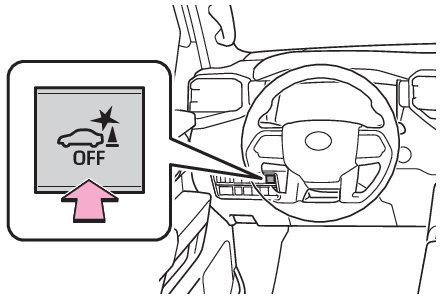
PKSB (Parking Support Brake)Enabling/Disabling the Parking Support BrakePress the switch to enable/disable the parking support brake.All of the Parking Support Brake functions (static objects and rear-crossing vehicles)
are enabled/disabled simultaneously.When the Parking Support Brake is disabled, the PKSB OFF indicator (Indicators) illuminates.To enable the system, press the switch again. If disabled using this method, the system
will not be re-enabled by turning the engine switch off and then to ON.Note:When towing a trailerWhen the 7-pin connector is connected and Auto Trailer Detection (ATD) (Auto Trailer Detection (ATD)) is activated, the function automatically turns off.When “
4L” mode selected (4WD models)The parking support brake is automatically disabled.Display and buzzer for engine output restriction control and brake controlIf the engine output restriction control or brake control operates, a buzzer will
sound and a message will be displayed on the multi-information display and head-up
display (if equipped), multimedia display, to alert the driver.Depending on the situation, engine output restriction control will operate to either
limit acceleration or restrict output as much as possible.Engine output restriction control is operating (acceleration restriction)Acceleration greater than a certain amount is restricted by the system.Multi-information display: “
Object Detected Acceleration Reduced”Multimedia display and head-up display (if equipped): No warning displayedPKSB OFF indicator: Not illuminatedBuzzer: Does not soundEngine output restriction control is operating (output restricted as much as possible)The system has determined that stronger-than-normal brake operation is necessary.Multimedia display: “
BRAKE!”Multi-information display and head-up display (if equipped): “
BRAKE!”PKSB OFF indicator: Not illuminatedBuzzer: Short beepBrake control is operatingThe system determined that emergency braking is necessary.Multimedia display: “
BRAKE!”Multi-information display and head-up display (if equipped): “
BRAKE!”PKSB OFF indicator: Not illuminatedBuzzer: Short beepVehicle stopped by system operationThe vehicle has been stopped by brake control operation.Multimedia display: “
Press Brake Pedal”Multi-information display and head-up display (if equipped): “
Switch to Brake” (If the accelerator pedal is not depressed, “
Press Brake Pedal” will be displayed.)PKSB OFF indicator: IlluminatedBuzzer: Short beepSystem overviewIf the Parking Support Brake determines that a collision with a detected object is
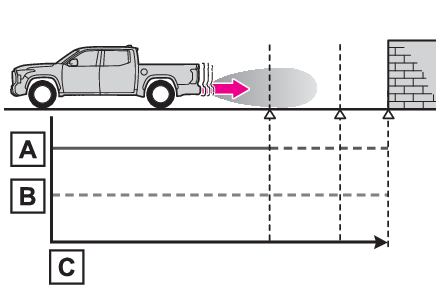
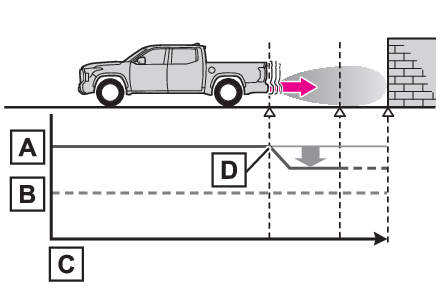
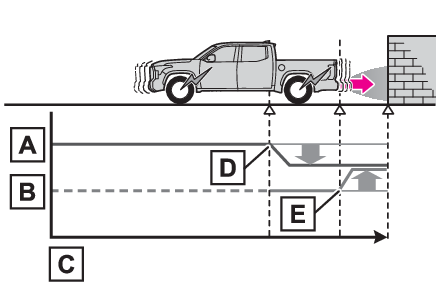
possible, the engine output will be restricted to restrain any increase in the vehicle
speed. (Engine output restriction control: See figure 2.)Additionally, if the accelerator
pedal continues to be depressed, the brakes will be applied automatically to reduce
the vehicle speed. (Brake control: See figure 3.)Figure 1 When the PKSB (Parking Support Brake) is not operatingEngine outputBraking forceTimeFigure 2 When engine output restriction control operatesEngine outputBraking forceTimeEngine output restriction control begins operating (System determines that possibility
of collision with detected object is high)Figure 3 When engine output restriction control and brake control operatesEngine outputBraking forceTimeEngine output restriction control begins operating (System determines that possibility
of collision with detected object is high)Brake control begins operating (System determines that possibility of collision with
detected object is extremely high)Note:If the Parking Support Brake has operatedIf the vehicle is stopped due to operation of the Parking Support Brake, the Parking
Support Brake will be disabled and the PKSB OFF indicator will illuminate. If the
Parking Support Brake operates unnecessarily, brake control can be canceled by depressing
the brake pedal or waiting for approximately 2 seconds for it to automatically be
canceled. Then, the vehicle can be operated by depressing the accelerator pedal.Re-enabling the Parking Support BrakeTo re-enable the Parking Support Brake when it has been disabled due to operation
of the Parking Support Brake, either enable the system again (Enabling/Disabling the Parking Support Brake), or turn the engine switch off and then back to ON.Additionally, if any of the following conditions are met, the system will be re-enabled
automatically and the PKSB OFF indicator will turn off:The P shift position is selectedThe object is no longer detected in the traveling direction of the vehicleThe traveling direction of the vehicle changesPKSB (Parking Support Brake)
Warning messageParking Support Brake (PKSB)
Warning messageIf “
PKSB Unavailable” is displayed on the multi-information display and the PKSB OFF indicator is onIf the vehicle is stopped due to operation of the Parking Support Brake, the Parking
Support Brake will be disabled and the PKSB OFF indicator will illuminate.A sensor may be covered with water drops, ice, snow, dirt, etc. Remove the water drops,
ice, snow, dirt, etc., from the sensor to return the system to normal.Also, due to
ice forming on a sensor at low temperatures, a warning message may be displayed or
the sensor may not be able to detect an object. Once the ice melts, the system will
return to normal.If this message continues to be displayed even after cleaning the sensor, or is displayed
even though the sensor is clean, have the vehicle inspected by your Toyota dealer.Initialization
Parking Support BrakeIf a battery terminal has been disconnected and reconnectedThe system needs to be initialized. To initialize the system, drive the vehicle straight
ahead for 5 seconds or more at a speed of approximately 22 mph (35 km/h) or more.