Keys
If the electronic key does not operate properlyElectronic key
If the electronic key does not operate properlyEmergency, in case of
If the electronic key does not operate properlyIf the electronic key does not operate properlyIf communication between the electronic key and vehicle is interrupted (Conditions affecting operation) or the electronic key cannot be used because the battery is depleted, the smart
key system and wireless remote control cannot be used. In such cases, the doors can
be opened and the hybrid system can be started by following the procedure below.Note:When the electronic key does not work properlyMake sure that the smart key system has not been deactivated in the customization
setting. If it is off, turn the function on. (Customizable features: Customizable features)Check if battery-saving mode is set. If it is set, cancel the function. (Electronic key battery-saving function)The electronic key function may be suspended. (Keys)Notice:In case of a smart key system malfunction or other key-related problemsTake your vehicle with all the electronic keys provided with your vehicle to your
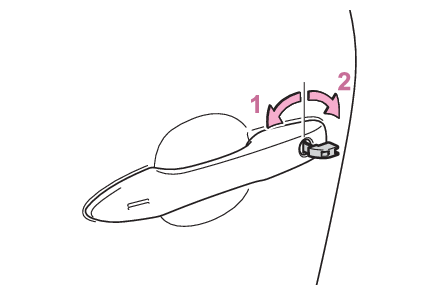
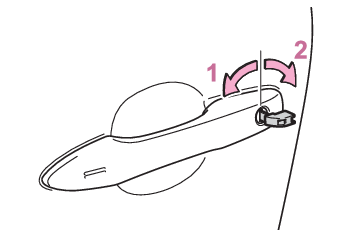
Toyota dealer.Locking and unlocking the doorsUse the mechanical key (Using the mechanical key) in order to perform the following operations:Locks all the doorsUnlocks all the doorsTurning the key unlocks the driver’s door. Turning the key again unlocks the other
doors.Note:Key linked functionsCloses the windows and moon roof*1 (turn and hold)*2Opens the windows and moon roof*1 (turn and hold)*2*1If equipped*2This setting must be customized at your Toyota dealer.Warning:When using the mechanical key and operating the power windows or moon roof (if equipped)Operate the power window or moon roof after checking to make sure that there is no
possibility of any passenger having any of their body parts caught in the window or
moon roof.Also, do not allow children to operate the mechanical key. It is possible
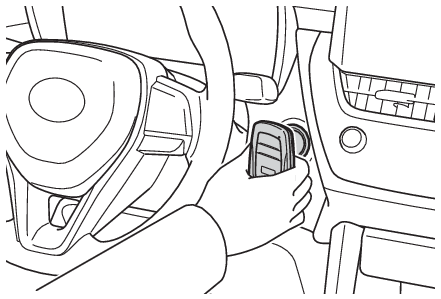
for children and other passengers to get caught in the power window or moon roof.Starting the hybrid systemEnsure that the shift lever is in P and depress the brake pedal.Touch the electronic key to the power switch.When the electronic key is detected, a buzzer sounds and the power switch will turn
to ON.When the smart key system is deactivated in customization setting, the power switch
will turn to ACC.Firmly depress the brake pedal and check that
is shown on the multi-information display.Press the power switch shortly and firmly.In the event that the hybrid system still cannot be started, contact your Toyota dealer.Note:Stopping the hybrid systemShift the shift lever to P and press the power switch as you normally do when stopping
the hybrid system.Electronic key batteryAs the above procedure is a temporary measure, it is recommended that the electronic
key battery be replaced immediately when the battery is depleted. (Electronic key battery)Alarm (if equipped)If a door is unlocked using the mechanical key when the alarm system is set, the alarm
may be triggered. (Alarm*)Changing power switch modesRelease the brake pedal and press the power switch in step 3 above.The hybrid system does not start and modes will be changed each time the switch
is pressed. (Changing power switch modes)