Toyota Safety Sense 3.0Toyota Safety Sense 3.0The Toyota Safety Sense 3.0 consists of the driving assist systems and contributes
to a safe and comfortable driving experience:Warning:Toyota Safety Sense 3.0The Toyota Safety Sense 3.0 operates under the assumption that the driver will drive
safely, and is designed to help reduce the impact to the occupants in a collision
and assist the driver under normal driving conditions.As there is a limit to the degree
of recognition accuracy and control performance that this system can provide, do not
overly rely on this system. The driver is solely responsible for paying attention
to the vehicle’s surroundings and driving safely.For safe useDo not overly rely on this system. The driver is solely responsible for paying attention
to the vehicle’s surroundings and driving safely. This system may not operate in all
situations and provided assistance is limited. Over-reliance on this system to drive
the vehicle safely may lead to an accident resulting in death or serious injury.Do not attempt to test the operation of the system, as it may not operate properly,
possibly leading to an accident.If attention is necessary while performing driving operations or a system malfunction
occurs, a warning message or warning buzzer will be operated. If a warning message
is displayed on the display, follow the instructions displayed.Depending on external noise, the volume of the audio system, etc. it may be difficult
to hear the warning buzzer. Also, depending on the road conditions, it may be difficult
to recognize the operation of the system.When it is necessary to disable the systemIn the following situations, make sure to disable the system.Failure to do so may lead to the system not operating properly, possibly leading to
an accident resulting in death or serious injury.When the vehicle is tilted due to being overloaded or having a flat tireWhen driving at extremely high speedsWhen towing another vehicleWhen the vehicle is being transported by a truck, ship, train, etc.When the vehicle is raised on a lift and the tires are allowed to rotate freelyWhen inspecting the vehicle using a drum tester such as a chassis dynamometer or speedometer
tester, or when using an on vehicle wheel balancerWhen the vehicle is driven in a sporty manner or off-roadWhen using an automatic car washWhen a sensor is misaligned or deformed due to a strong impact being applied to the
sensor or the area around the sensorWhen accessories which obstruct a sensor or light are temporarily installed to the
vehicleWhen a compact spare tire or tire chains are installed to the vehicle or an emergency
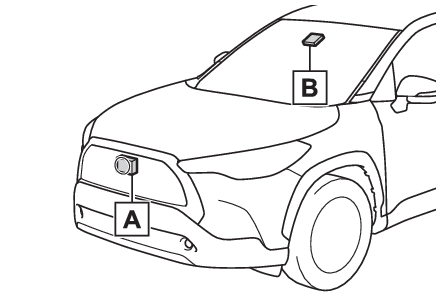
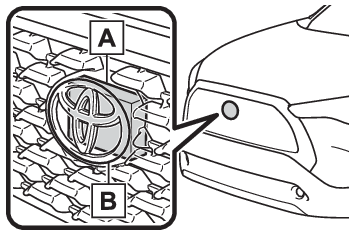
tire puncture repair kit has been usedWhen the tires are excessively worn or the inflation pressure of the tires is lowWhen tires other than the manufacturer specified size are installedWhen the vehicle cannot be driven stably, due to a collision, malfunction, etc.Driving assist systemsAHB (Automatic High Beam)AHB (Automatic High Beam)PCS (Pre-Collision System)PCS (Pre-Collision System)LTA (Lane Tracing Assist)LTA (Lane Tracing Assist)LDA (Lane Departure Alert)LDA (Lane Departure Alert)RSA (Road Sign Assist)*RSA (Road Sign Assist)**If equippedDynamic radar cruise controlDynamic radar cruise controlCruise controlCruise controlEmergency Driving Stop SystemEmergency Driving Stop SystemSensors used by Toyota Safety Sense 3.0Various sensors are used to obtain the necessary information for system operation.Sensors which detect the surrounding conditionsFront radar sensorFront cameraWarning:To prevent malfunction of the radar sensorsObserve the following precautions. Failure to do so may lead to a radar sensor not
operating properly, possibly leading to an accident resulting in death or serious
injury.Keep the radar sensors and radar sensor covers clean at all times.Clean the front of a radar sensor or the front or back of a radar sensor cover if
it is dirty or covered with water droplets, snow, etc.When cleaning the radar sensor and radar sensor cover, use a soft cloth to remove
dirt so as to not damage them.Radar sensorRadar sensor coverDo not attach accessories, stickers (including transparent stickers), aluminum tape,
etc. to a radar sensor or radar sensor cover and their surrounding area.Do not subject a radar sensor or its surrounding area to impact.If a radar sensor,
the front grille, or front bumper has been subjected to a impact, have the vehicle
inspected by your Toyota dealer.Do not disassemble the radar sensors.Do not modify or paint the radar sensors or radar sensor cover, or replace them with
anything other than Toyota genuine parts.In the following situations, recalibration of the radar sensors will be necessary.
For details, contact your Toyota dealer.When a radar sensor is removed and installed, or replacedWhen the front bumper or the front grille has been replacedTo prevent malfunction of the front cameraObserve the following precautions.Failure to do so may lead to the front camera not
operating properly, possibly leading to an accident resulting in death or serious
injury.Always keep the windshield clean.If the windshield is dirty or covered with an oily film, water droplets, snow, etc.,
clean the windshield.Even if a glass coating agent is applied to the windshield, it will still be necessary
to use the windshield wipers to remove water droplets, etc. from the area of the windshield
in front of the front camera.If the inner side of the windshield where the front camera is installed is dirty,
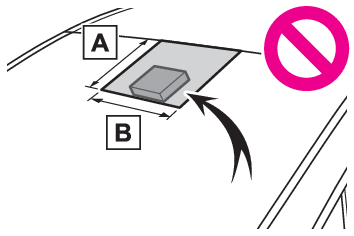
contact your Toyota dealer.Do not attach stickers (including transparent stickers) or other items to the area
of the windshield in front of the front camera (shaded area in the illustration).Approximately 1.6 in. (4 cm)Approximately 1.6 in. (4 cm)If the part of the windshield in front of the front camera is fogged up or covered
with condensation or ice, use the windshield defogger to remove the fog, condensation,
or ice.If water droplets cannot be properly removed from the area of the windshield in front
of the front camera by the windshield wipers, replace the wiper insert or wiper blade.Do not attach window tint to the windshield.Replace the windshield if it is damaged or cracked.If the windshield has been replaced,
recalibration of the front camera will be necessary. For details, contact your Toyota
dealer.Do not allow liquids to contact the front camera.Do not allow bright lights to shine into the front camera.Do not damage the lens of the front camera or allow it to become dirty.When cleaning
the inside of the windshield, do not allow glass cleaner to contact the lens of the
front camera. Do not touch the lens of the front camera.If the lens of the front camera
is dirty or damaged, contact your Toyota dealer.Do not subject the front camera to a strong impact.Do not change the position or orientation of the front camera or remove it.Do not disassemble the front camera.Do not modify any parts around the front camera, such as the inside rear view mirror
or ceiling.Do not attach accessories which may obstruct the front camera to the hood, front grille,
or front bumper. For details, contact your Toyota dealer.If a surfboard or other long object is to be mounted on the roof, make sure that it
will not obstruct the front camera.Do not modify or change the headlights and other lights.Front camera installation area on the windshieldIf the system determines that the windshield may be fogged up, it will automatically
operate the heater to defog the part of the windshield around the front camera. When
cleaning, etc., be careful not to touch the area around the front camera until the
windshield has cooled sufficiently, as touching it may cause burns.Note:Situations in which the sensors may not operate properlyWhen the height or inclination of the vehicle has been changed due to modificationsWhen the windshield is dirty, fogged up, cracked or damagedWhen the ambient temperature is high or lowWhen mud, water, snow, dead insects, foreign matter, etc., is attached to the front
of the sensorWhen in inclement weather such as heavy rain, fog, snow, or a sandstormWhen water, snow, dust, etc. is thrown up in front of the vehicle, or when driving
through mist or smokeWhen the headlights are not illuminated while driving in the dark, such as at night
or when in a tunnelWhen the lens of a headlight is dirty and illumination is weakWhen the headlights are misalignedWhen a headlight is malfunctioningWhen the headlights of another vehicle, sunlight, or reflected light shines directly
into the front cameraWhen the brightness of the surrounding area changes suddenlyWhen driving near a TV tower, broadcasting station, electric power plant, radar equipped
vehicles, etc., or other location where strong radio waves or electrical noise may
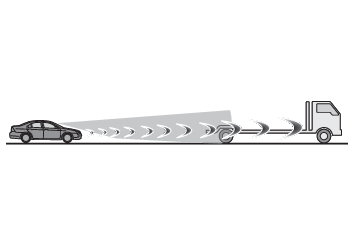
be presentWhen a wiper blade is blocking the front cameraWhen in a location or near objects which strongly reflect radio waves, such as the
following:TunnelsTruss bridgesGravel roadsRutted, snow-covered roadsWallsLarge trucksManhole coversGuardrailMetal platesWhen near a step or protrusionWhen a detectable vehicle is narrow, such as a small mobility vehicleWhen a detectable vehicle has a small front or rear end, such as an unloaded truckWhen a detectable vehicle has a low front or rear end, such as a low bed trailerWhen a detectable vehicle has extremely high ground clearanceWhen a detectable vehicle is carrying a load which protrudes from its cargo areaWhen a detectable vehicle has little exposed metal, such as a vehicle which is partially
covered with cloth, etc.When a detectable vehicle is irregularly shaped, such as a tractor, sidecar, etc.When the distance between the vehicle and a detectable vehicle has become extremely
shortWhen a detectable vehicle is at an angleWhen snow, mud, etc. is attached to a detectable vehicleWhen driving on the following kinds of roads:Roads with sharp curves or winding roadsRoads with changes in grade, such as sudden inclines or declinesRoads which is sloped to the left or rightRoads with deep rutsRoads which are rough and unmaintainedRoads which frequently undulate or are bumpyWhen the steering wheel is being operated frequently or suddenlyWhen the vehicle is not in a constant position within a laneWhen parts related to this system, the brakes, etc. are cold or extremely hot, wet,
etc.When the wheels are misalignedWhen driving on slick road surfaces, such as when it is covered with ice, snow, gravel,
etc.When the course of the vehicle differs from the shape of a curveWhen the vehicle speed is excessively high when entering a curveWhen entering/exiting a parking lot, garage, car elevator, etc.When driving in a parking lotWhen driving through an area where there are obstructions which may contact your vehicle,
such as tall grass, tree branches, a curtain, etc.When driving in strong windSituations in which the lane may not be detectedWhen the lane is extremely wide or narrowImmediately after changing lanes or passing through an intersectionWhen driving in a temporary lane or lane regulated by constructionWhen there are structures, patterns, shadows which are similar to lane lines in the
surroundingWhen there are multiple white lines for a lane lineWhen the lane lines are not clear or driving on a wet road surfaceWhen a lane line is on a curbWhen driving on a bright, reflective road surface, such as concreteSituations in which some or all of the functions of the system cannot operateWhen a malfunction is detected in this system or a related system, such as the brakes,
steering, etc.When the VSC, TRAC, or other safety related system is operatingWhen the VSC, TRAC, or other safety related system is offChanges in brake operation sound and pedal responseWhen the brakes have been operated, brake operation sounds may be heard and the brake
pedal response may change, but this does not indicate a malfunction.When the system is operating, the brake pedal may feel stiffer than expected or sink.
In either situation the brake pedal can be depressed further. Further depress the
brake pedal as necessary.