Keys
Mechanical keyKeys
Key number plateKeys
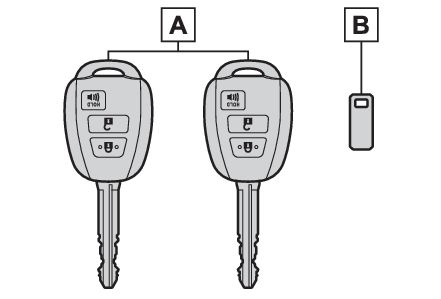
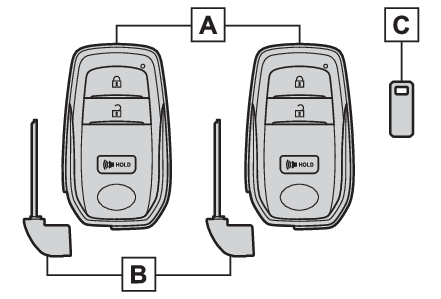
Electronic keyKeysElectronic keyKeysThe keysThe following keys are provided with the vehicle.Vehicles without a smart key systemKeysOperating the wireless remote control function (Wireless remote control) Key number plateVehicles with a smart key system Electronic keysOperating the smart key system (Smart key system*)Operating the wireless remote control function (Wireless remote control) Mechanical keys Key number plateNote:When riding in an aircraftWhen bringing a key or an electronic key onto an aircraft, make sure you do not press
any buttons on the key or the electronic key while inside the aircraft cabin. If you
are carrying a key or an electronic key in your bag, etc., ensure that the buttons
are not likely to be pressed accidentally. Pressing a button may cause the key or
the electronic key to emit radio waves that could interfere with the operation of
the aircraft. Key battery depletionVehicles without a smart key systemThe standard battery life is 1 to 2 years.The battery will become depleted even if the key is not used. The following symptoms
indicate that the key battery may be depleted. Replace the battery when necessary.
(Wireless remote control/electronic key battery*)The wireless remote control does not operate.The detection area becomes smaller.Vehicles with a smart key systemThe standard battery life is 1 to 2 years.If the battery becomes low, an alarm will sound in the cabin and a message will be
shown on the multi-information display when the engine is stopped.To reduce key battery depletion when the electronic key is to not be used for long
periods of time, set the electronic key to the battery-saving mode. (Electronic key battery-saving function)As the electronic key always receives radio waves, the battery will become depleted
even if the electronic key is not used. The following symptoms indicate that the electronic
key battery may be depleted. Replace the battery when necessary. (Wireless remote control/electronic key battery*)The smart key system or the wireless remote control does not operate.The detection area becomes smaller.The LED indicator on the key surface does not turn on.To avoid serious deterioration, do not leave the electronic key within 3 ft. (1 m)
of the following electrical appliances that produce a magnetic field:TVsPersonal computersCellular phones, cordless phones and battery chargersRecharging cellular phones or cordless phonesTable lampsInduction cookersIf the electronic key is near the vehicle for longer than necessary, even if the smart
key system is not operated, the key battery may become depleted faster than normal.Replacing the batteryWireless remote control/electronic key battery*If “A New Key has been Registered Contact Your Dealer for Details” is shown on the
multi-information display (vehicles with a smart key system)This message will be displayed each time the driver’s door is opened when the doors
are unlocked from the outside for approximately 10 days after a new electronic key
has been registered.If this message is displayed but you have not had a new electronic
key registered, ask your Toyota dealer to check if an unknown electronic key (other
than those in your possession) has been registered.Notice:To prevent key damageDo not drop the keys, subject them to strong shocks or bend them.Do not expose the keys to high temperatures for long periods of time.Do not get the keys wet or wash them in an ultrasonic washer etc.Vehicles with a smart key system: Do not attach metallic or magnetic materials to
the keys or place the keys close to such materials.Do not disassemble the keys.Do not attach a sticker or anything else to the surface of the key.Vehicles with a smart key system: Do not place the keys near objects that produce
magnetic fields, such as TVs, audio systems and induction cookers.Vehicles with a smart key system: Do not place the keys near medical electrical equipment
such as low-frequency therapy equipment or microwave therapy equipment, and do not
receive medical attention with the keys on your person.Carrying the electronic key on your person (vehicles with a smart key system)Carry the electronic key 3.9 in. (10 cm) or more away from electric appliances that
are turned on. Radio waves emitted from electric appliances within 3.9 in. (10 cm)
of the electronic key may interfere with the key, causing the key to not function
properly.In case of a smart key system malfunction or other key-related problems (vehicles
with a smart key system)In case of a smart key system malfunction or other key-related problemsWhen an electronic key is lost (vehicles with a smart key system)When an electronic key is lost (vehicles with a smart key system)Wireless remote control
Locking/UnlockingWireless remote controlKeys
Wireless remote controlKeyless entry
Wireless remote controlDoor lock
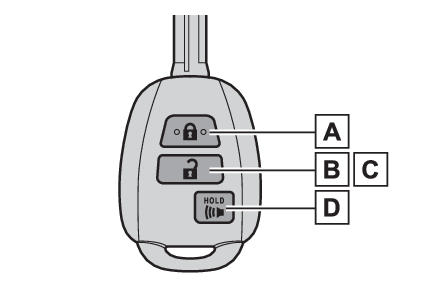
Wireless remote controlWireless remote controlThe keys are equipped with the following wireless remote control:Vehicles without a smart key systemLocks the doors (Wireless remote controlVehicles without a smart key systemVehicles with a smart key
system)Unlocks the doors (Wireless remote controlVehicles without a smart key systemVehicles with a smart key
system)Opens the windows*1 (Wireless remote controlVehicles without a smart key systemVehicles with a smart key
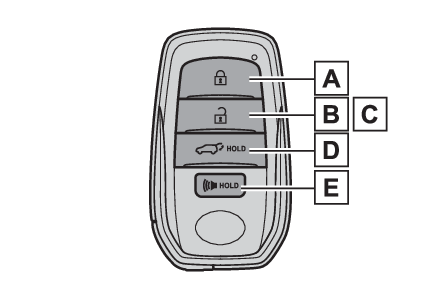
system)Sounds the alarm (Panic mode)Vehicles with a smart key systemLocks the doors (Wireless remote controlVehicles without a smart key systemVehicles with a smart key
system)Unlocks the doors (Wireless remote controlVehicles without a smart key systemVehicles with a smart key
system)Opens the windows*1 and moon roof*1, 2 (Wireless remote controlVehicles without a smart key systemVehicles with a smart key
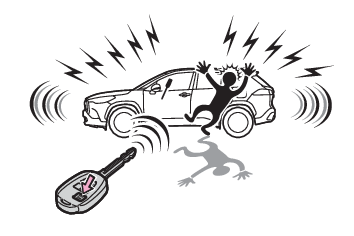
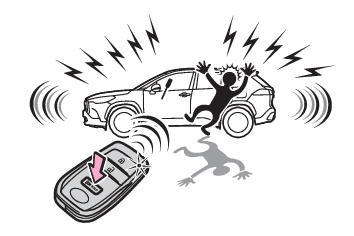
system)Opens and closes the power back door*2 (Opening/closing the back door using the wireless remote control)Sounds the alarm (Panic mode)*1This setting must be customized at your Toyota dealer.*2If equippedNote:Panic modePanic modeVehicles without a smart key systemWhen
is pressed for longer than about one second, an alarm will sound intermittently and
the vehicle lights will flash to deter any person from trying to break into or damage
your vehicle.To stop the alarm, press any button on the wireless remote control.Vehicles with a smart key systemWhen
is pressed for longer than about one second, an alarm will sound intermittently and
the vehicle lights will flash to deter any person from trying to break into or damage
your vehicle.To stop the alarm, press any button on the electronic key.Conditions affecting the operation of the smart key system or wireless remote controlVehicles without a smart key systemThe wireless remote control function may not operate normally in the following situations:When the wireless key battery is depletedNear a TV tower, electric power plant, gas station, radio station, large display,
airport or other facility that generates strong radio waves or electrical noiseWhen carrying a portable radio, cellular phone or other wireless communication devicesWhen the wireless key is in contact with, or is covered by a metallic objectWhen a wireless key (that emits radio waves) is being used nearbyIf window tint with a metallic content or metallic objects are attached to the rear
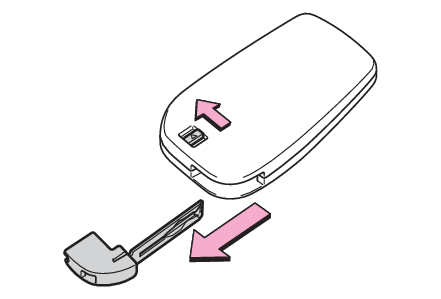
windowVehicles with a smart key systemConditions affecting operationUsing the mechanical key (vehicles with a smart key system)To take out the mechanical key, slide the release button and take the key out.The mechanical key can only be inserted in one direction, as the key only has grooves
on one side. If the key cannot be inserted in a lock cylinder, turn it over and re-attempt
to insert it.After using the mechanical key, store it in the electronic key. Carry the mechanical
key together with the electronic key. If the electronic key battery is depleted or
the entry function does not operate properly, you will need the mechanical key. (If the electronic key does not operate properly (vehicles with a smart key system))Note:If you lose your mechanical keysIf you lose your keysIf a wrong key is usedThe key cylinder rotates freely, isolated from the internal mechanism.