A/C
Rear automatic air conditioning systemAir conditioning system
Rear automatic air conditioning systemHeaters
Rear automatic air conditioning systemRear automatic air conditioning systemRear heater systemA/CAir conditioning systemAutomatic air conditioning systemRear automatic air conditioning systemAir outlets and fan speed are automatically adjusted according to the temperature
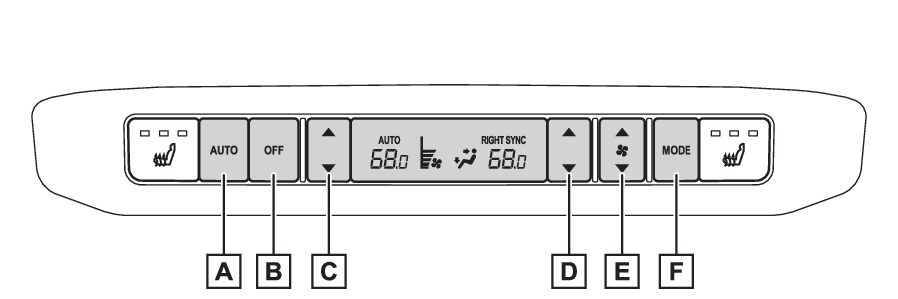
setting.Air conditioning controls“AUTO” switch (automatic mode)“OFF” switchLeft-hand side temperature control switchRight-hand side temperature control switch (if equipped)Fan speed control switchAirflow mode control switchAdjusting the temperature settingVehicles with “
3-ZONE” modeIn the individual mode, operate the temperature control switch upwards to increase
the rear seats temperature and downwards to decrease the rear seats temperature.To change to the synchronous mode from the individual mode, press the “
OFF” switch and then press the “
AUTO” switch.Vehicles with “
4-ZONE” modeTo adjust the temperature for the left-hand side rear seats and right-hand side rear
seats together, operate the rear left-hand side temperature control switch upwards
to increase the temperature and downwards to decrease the temperature. To adjust the temperature for the right-hand side rear seats separately from the left-hand
side rear seats, operate the right-hand side temperature control switch. Then, operate
the left-hand side temperature control switch to adjust the left-hand rear seats.
(The “
SYNC” of “
RIGHT SYNC” display on the rear air conditioning operation panel disappears)To change to the synchronous mode from the individual mode, press the “
OFF” switch and then press the “
AUTO” switch.Adjusting the fan speed settingOperate the fan speed control switch upwards to increase the fan speed and downwards
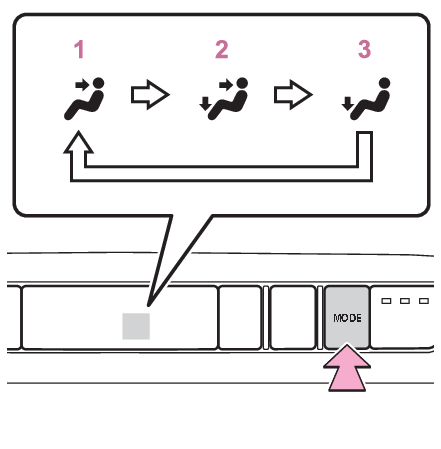
to decrease the fan speed.Press the “OFF” switch to turn off the fan.Change the airflow modePress the airflow mode control switch.The airflow mode changes as follows each time the switch is pressed.Upper bodyUpper body and feetFeetNote:Ventilation and air conditioning odorsDuring use, various odors from inside the vehicle may enter into and accumulate in
the air conditioning system. This may then cause odor to be emitted from the vents.To reduce potential odors from occurring: The start timing of the blower may be delayed
for a short period of time immediately after the air conditioning system is started
in automatic mode.Notice:To prevent 12-volt battery dischargeDo not leave the rear air conditioning system on longer than necessary when the hybrid
system is off.Using the automatic modePress the “AUTO” switch. (“AUTO” appears on the display)The dehumidification function begins to operate. Air outlets and fan speed are automatically
adjusted according to the temperature setting.Adjust the temperature setting.To stop the operation, press the “OFF” switch.If the fan speed setting or air flow modes are operated, the automatic mode indicator
goes off. However, automatic mode for functions other than that operated is maintained.Note:Using automatic modeFan speed is adjusted automatically according to the temperature setting. Therefore,
the fan may stop for a while until warm or cool air is ready to flow immediately after
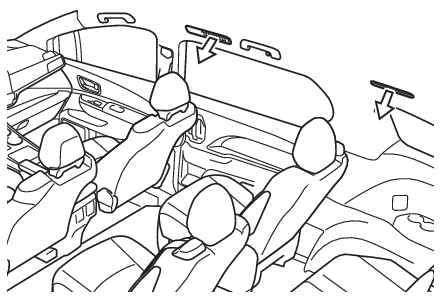
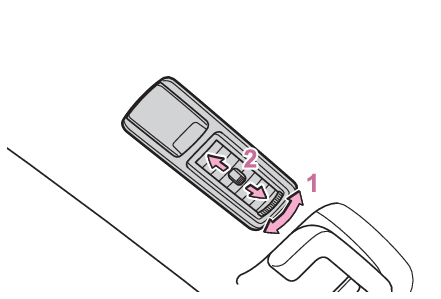
the “AUTO” switch is pressed.Changing the rear seat settings from the front control panelChanging the rear seat settings (if equipped)Air outlet layout and operationsLocation of air outletsThe air outlets and air volume changes according to the selected air flow mode.Adjusting the air flow direction and opening/closing the air outlets (side ceiling)Direct air flow to up or down.Direct air flow to the left or right and turns the knob to open or close the ventTo close the vent, move the knob rearward.