RCD (Rear Camera Detection)
FunctionRCD (Rear Camera Detection) function**If equippedWhen the vehicle is backing up, the rear camera detection function can detect pedestrians
in the detection area behind the vehicle. If a pedestrian is detected, a buzzer will
sound and an icon will be displayed on the audio system screen to inform the driver
of the pedestrian.Warning:Cautions regarding the use of the systemThe recognition and control capabilities for this system are limited. The driver should
always drive safely by always being responsible without over relying on the system
and have a understanding of the surrounding situations.To ensure the system can operate properlyObserve the following, otherwise there is the danger that could lead to an accident.Always clean the camera without damaging it.Do not install market electronic parts (such as Illuminated license plate, fog lamps,
etc.) in the camera vicinity.Do not subject the camera vicinity to strong impacts. If the vicinity is subjected
to a strong impact, have the vehicle inspected by your Toyota dealer.Do not disassemble, remodel or paint the camera.Do not attach accessories or stickers to the camera.Do not install market protection parts (bumper trim, etc.) to the rear bumper.Maintain suitable tire air pressure.Make sure the back door is completely closed.RCD function is turned offIn the following situations the system turns off. The RCD function may not operate
properly and thus there is the danger that an accident may occur.The contents mentioned above are not observed.Suspensions other than Toyota genuine parts are installed.Display
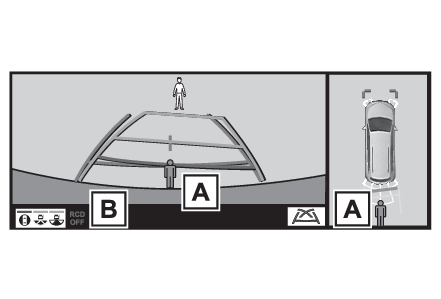
RCD (Rear Camera Detection)Display (audio system screen)Pedestrian detection iconDisplayed automatically when a pedestrian is detected.RCD OFF iconWhen the RCD function is disabled, the RCD OFF icon illuminates. (Each time the power
switch is turned off then changed to ON, the RCD function will be enabled automatically.)Switches
RCD (Rear Camera Detection) switchTurning the RCD function on/offUse the meter control switches to enable/disable the RCD function. (Settings display)4.2-inch displayPress
or
of the meter control switches and select
.Press
or
of the meter control switches to select “
RCD” and then press “
OK”.7-inch displayPress
or
of the meter control switches and select
.Press
or
of the meter control switches to select “
RCD” and then press “
OK”.ON and OFF will be switched when “
OK” is pressed.When the RCD function is disabled, the RCD OFF indicator (Indicators) illuminates on the multi-information display.When a pedestrian is detectedIf the rear camera detection function detects a pedestrian in the detection area,
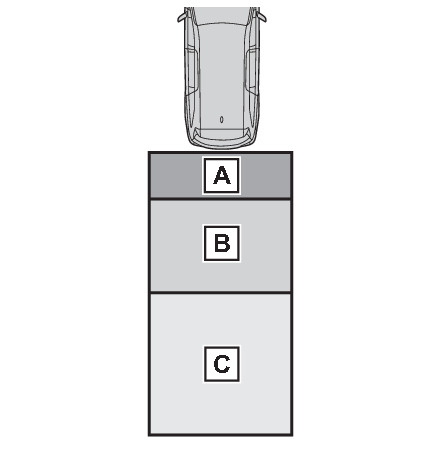
the buzzer and pedestrian detection will operate as follows:If a pedestrian is detected in area
Buzzer: Sounds repeatedlyPedestrian detection icon: Blinks 3 times and then stays
onIf a pedestrian is detected in area
Buzzer (When the vehicle is stationary): Sounds 3 timesBuzzer (When the vehicle is
backing up, when a pedestrian approaches the rear of the vehicle): Sounds repeatedlyPedestrian
detection icon: Blinks 3 times and then stays onIf the system determines that your vehicle may collide with a pedestrian in area
Buzzer: Sounds repeatedlyPedestrian detection icon: Blinks 3 times and then stays
onNote:The rear camera detection function is operational whenThe power switch is in ON.RCD function is on.The shift lever is in R.Setting the buzzer volumeThe buzzer volume can be adjusted on the multi-information display. (Settings display)Muting the buzzer soundThe buzzer can be temporarily muted by pressing “
OK” of the meter control switches while a suggestion that says mute is available is
shown on the multi-information display.RCD (Rear Camera Detection)
Warning messageIf “
Rear Camera Detection Unavailable Remove the Dirt of Rear Camera” is displayed on the multi-information displayA rear camera lens may be dirty or covered with snow or ice. In such cases, if it
is removed from the rear camera lens, the system should return to normal. (It may
be necessary to drive the vehicle for some time before the system returns to normal.
Even after the camera cleaning washer operated, driving the vehicle may also be necessary.)If “
Rear Camera Detection Unavailable See Owner’s Manual” is displayed on the multi-information displayIf this message is displayed after the 12-volt battery has been disconnected and reconnected,
fully turn the steering wheel to the left and then the right on level ground.If this message is displayed only when the shift lever is in R, the rear camera lens
may be dirty. Clean the rear camera lens.Situations in which the system may not operate properlySome pedestrians, such as the following, may not be detected by the rear camera detection
function, preventing the function from operating properly:Pedestrians who are bending forward or squattingPedestrians who are lying downPedestrians who are runningPedestrians who suddenly enter the detection areaPeople riding a bicycle, skateboard, or other light vehiclePedestrians wearing oversized clothing such as a rain coat, long skirt, etc., making
their silhouette obscurePedestrians whose body is partially hidden by an object, such as a cart or umbrellaPedestrians which are obscured by darkness, such as at nightIn some situations, such as the following, pedestrians may not be detected by the
rear camera detection function, preventing the function from operating properly:When backing up in inclement weather (rain, snow, fog, etc.)When the rear camera is obscured (dirt, snow, ice, etc. are attached) or scratchedWhen a very bright light, such as the sun, or the headlights of another vehicle, shines
directly into the rear cameraWhen backing up in a place where the surrounding brightness changes suddenly, such
as at the entrance or exit of a garage or underground parking lotWhen backing up in a dim environment such as during dusk or in an underground parking
lotWhen the dedicated camera cleaning washer is operatingWhen the camera position and direction are deviatedWhen a towing hook is attachedWhen water droplets are flowing on the camera lensWhen the vehicle height is extremely changed (nose up, nose down)When tire chains or an emergency tire puncture repair kit are usedSituations in which the system may operate unexpectedlyEven though there are no pedestrians in the detection area, some objects, such as
the following, may be detected, possibly causing the rear camera detection function
to operate.Three dimensional objects, such as a pole, traffic cone, fence, or parked vehicleMoving objects, such as a car or motorcycleObjects moving toward your vehicle when backing up, such as flags or puddles (or airborne
matter, such as smoke, steam, rain, or snow)Cobblestone or gravel roads, tram rails, road repairs, white lines, pedestrian crossings
or fallen leaves on the roadMetal covers (gratings), such as those used for drainage ditchesObjects reflected in a puddle or on a wet road surfaceShadows on the roadIn some situations, such as the following, the rear camera detection function may
operate even though there are no pedestrians in the detection area.When backing up toward the roadside or a bump on the roadWhen backing up toward an incline/declineIf the rear of the vehicle is raised or lowered due to the carried loadIf a bumper protector, such as an additional trim strip, is installed to the rear
bumperIf the orientation of the rear camera has been changed due to a collision or other
impact, or removal and installationWhen water is flowing over the rear camera lensWhen the rear camera is obscured (dirt, snow, ice, etc. are attached) or scratchedIf there is a flashing light in the detection area, such as the emergency flashers
of another vehicleWhen tire chains or an emergency tire puncture repair kit are used.Situations in which the rear camera detection function may be difficult to noticeThe buzzer may be difficult to hear if the surrounding area is noisy, the volume of
the audio system volume is high, the air conditioning system is being used, etc.If the temperature in the cabin is extremely high or low, the audio system screen
may not operate correctly.