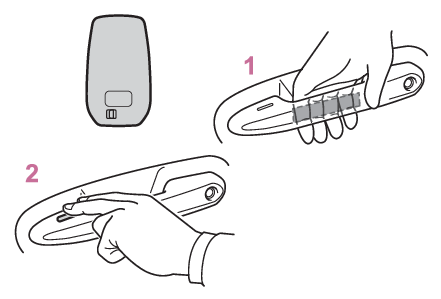
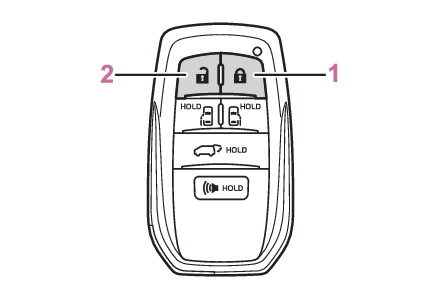
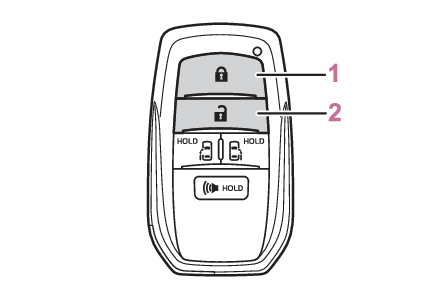
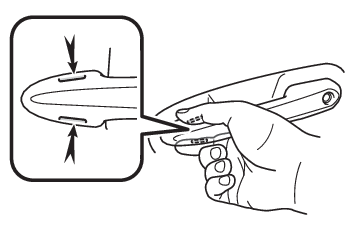
Front doors The vehicle can be locked and unlocked using the entry function (if equipped), wireless remote control, key or door lock switch. Unlocking and locking the doors from the outside Smart key system Entry functions Using the entry function (if equipped) Carry the electronic key to enable this function. Grip the driver’s door handle to unlock the door. Holding the driver’s door handle for approximately 2 seconds unlocks all the doors.Grip the front passenger’s door handle to unlock all the doors*. Make sure to touch the sensor on the back of the handle.The doors cannot be unlocked for 3 seconds after the doors are locked. *The door unlock settings can be changed. (Switching the door unlock function (vehicles with entry function)) Touch the lock sensor (the indentation on the upper part of the door handle) to lock the doors. Check that the door is securely locked. Using the wireless remote control Vehicles with power back door Locks all the doors Check that the door is securely locked. Unlocks all the doors Pressing the button unlocks the driver’s door. Pressing the button again within 5 seconds unlocks the other doors. Press and hold to open the windows*1 and moon roof*1, 2 *1This setting must be customized at your Toyota dealer. *2If equipped Vehicles without power back door Locks all the doors Check that the door is securely locked. Unlocks all the doors Pressing the button unlocks the driver’s door. Pressing the button again within 5 seconds unlocks the other doors. Press and hold to open the windows*1 and moon roof*1, 2 *1This setting must be customized at your Toyota dealer. *2If equipped Using the key The doors can also be locked and unlocked with the mechanical key. (Locking and unlocking the doors) Note: Switching the door unlock function (vehicles with entry function) It is possible to set which doors the entry function unlocks using the wireless remote control. Perform the switching operation in the vehicle or within approximately 3.2 ft. (1 m) of the vehicle. Turn the power switch to OFF. When the indicator light on the key surface is not on, press and hold , , , or for approximately 5 seconds while pressing and holding . The setting changes each time an operation is performed, as shown below. (When changing the setting continuously, release the buttons, wait for at least 5 seconds, and repeat step 2.)
Multi-information display/Beep Unlocking function
Exterior: Beeps 3 times Interior: Pings once Holding the driver’s door handle unlocks only the driver’s door.
Holding the passenger’s door handle unlocks all the doors.
Exterior: Beeps twice Interior: Pings once Holding a door handle unlocks all the doors.
Vehicles with alarm: To prevent unintended triggering of the alarm, unlock the doors using the wireless remote control and open and close a door once after the settings have been changed. (If a door is not opened within 60 seconds after is pressed, the doors will be locked again and the alarm will automatically be set.)In a case that the alarm is triggered, immediately stop the alarm. (Alarm*)
Impact detection door lock release system In the event that the vehicle is subject to a strong impact, all the doors are unlocked. Depending on the force of the impact or the type of accident, however, the system may not operate. Operation signals (vehicles with entry function) A buzzer sounds and the emergency flashers flash to indicate that the doors have been locked/unlocked. (Locked: Once; Unlocked: Twice) Security feature If a door is not opened within approximately 60 seconds after the vehicle is unlocked, the security feature automatically locks the vehicle again. (Vehicles with entry function: However, depending on the location of the electronic key, the key may be detected as being in the vehicle. In this case, vehicle may be unlocked.) When the door cannot be locked by the lock sensor on the upper part of the door handle (vehicles with entry function) If the door will not lock even when the topside sensor area is touched, try touching both the topside and underside sensor areas at the same time. When gloves are being worn, remove the gloves. Door lock buzzer If an attempt to lock the doors using the entry function or wireless remote control is made when a door is not fully closed, a buzzer sounds continuously for 5 seconds. Fully close the door to stop the buzzer, and lock the vehicle once more. Setting the alarm (if equipped) Locking the doors will set the alarm system. (Alarm*) Conditions affecting the operation of the smart key system or wireless remote control Conditions affecting operation If the smart key system or the wireless remote control does not operate properly Use the mechanical key to lock and unlock the doors. (Locking and unlocking the doors) Replace the key battery with a new one if it is depleted. (Electronic key battery) If the 12-volt battery is discharged The doors cannot be locked and unlocked using the smart key system or wireless remote control. Lock or unlock the doors using the mechanical key. (Using the key, Locking and unlocking the doors) Rear seat reminder function In order to remind you not to forget the luggage, etc. on the rear seat, when the power switch is turned to OFF after any of the following conditions are met, a buzzer will sound and a message will be displayed on the multi-information display for approximately 6 seconds. The hybrid system is started within 10 minutes after opening and closing a sliding door. A sliding door has been opened and closed after the hybrid system is started. However, if a sliding door is opened and then closed within approximately 2 seconds, the rear seat reminder function may not operate. The rear seat reminder function determines that the luggage, etc. has been placed on the rear seat depending on opening and closing of a sliding door. Therefore, depending on the situation, the rear seat reminder function may not operate and you may still forget the luggage, etc. on the rear seat, or it may operate unnecessarily. The rear seat reminder function can be enabled/disabled. (Gauges, meters and multi-information display (, , )) Customization Settings (e.g. unlocking function using a key) can be changed.(Customizable features: Door lock (, ))
Warning: To prevent an accident Observe the following precautions while driving the vehicle.Failure to do so may result in a door opening and an occupant could be thrown out of the vehicle, resulting in death or serious injury. Ensure that all doors are properly closed and locked. Do not pull the inside handle of the doors while driving.Be especially careful for the front doors, as the doors may be opened even if the inside lock buttons are in locked position. When opening or closing a door Check the surroundings of the vehicle such as whether the vehicle is on an incline, whether there is enough space for a door to open and whether a strong wind is blowing. When opening or closing the door, hold the door handle tightly to prepare for any unpredictable movement. When using the wireless remote control and operating the power windows or moon roof (if equipped) Operate the power window or moon roof (if equipped) after checking to make sure that there is no possibility of any passenger having any of their body parts caught in the window or moon roof (if equipped). Also, do not allow children to operate the wireless remote control. It is possible for children and other passengers to get caught in the power window or moon roof (if equipped).
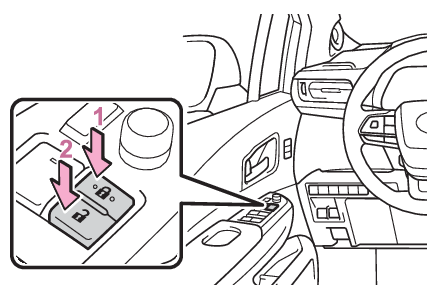
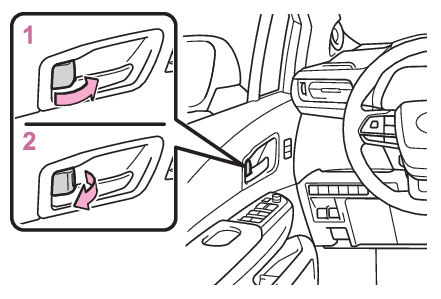
Unlocking and locking the doors from the inside Switches Power door lock switch Switches Door lock switch Using the door lock switches Locks all the doors Unlocks all the doors Using the inside lock buttons Locks the door Unlocks the door The front doors can be opened by pulling the inside handle even if the lock buttons are in the lock position. Note: Locking the front doors from the outside without a key Move the inside lock button to the lock position. Close the door. The door cannot be locked if the power switch is in ACC or ON, or the electronic key is left inside the vehicle. Depending on the position of the electronic key, the key may not be detected correctly and the door may be locked. Doors Open door warning buzzer Warning buzzers Open hood Warning buzzers Open door Open door warning buzzer If the vehicle speed reaches 3 mph (5 km/h), a buzzer sounds to indicate that the door(s) or the hood is not fully closed.The open door(s) or hood is displayed on the multi-information display. When all the doors are locked with the entry function, wireless remote control or key The doors cannot be unlocked with the door lock switch. The door lock switch can be reset by unlocking all the doors with the entry function, wireless remote control or key. Doors Automatic door locking and unlocking system Automatic door locking and unlocking systems The following functions can be set or canceled: For instructions on customizing, refer to Customizing vehicle features.
Function Operation
Speed linked door locking function All doors are automatically locked when vehicle speed is approximately 12 mph (20 km/h) or higher.
Shift position linked door locking function All doors are automatically locked when shifting the shift lever to position other than P.
Shift position linked door unlocking function All doors are automatically unlocked when shifting the shift lever to P.
Driver’s door linked door unlocking function All doors are automatically unlocked when driver’s door is opened within approximately 45 seconds after turning the power switch off.