Meter
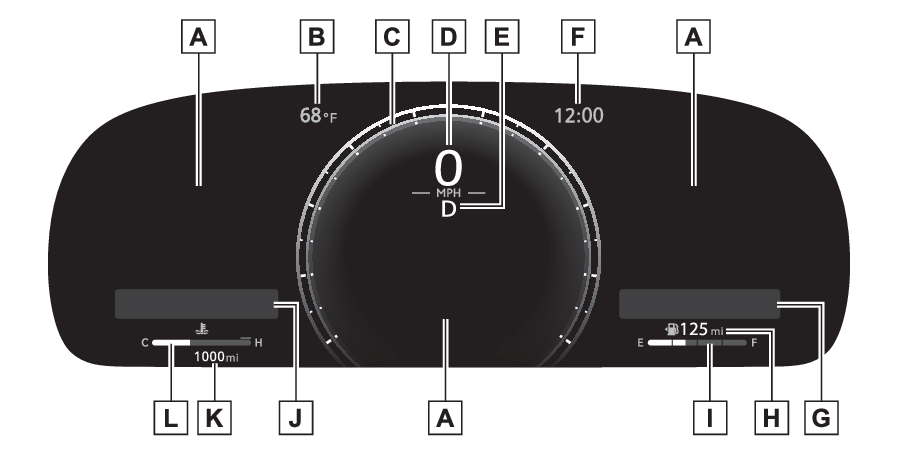
MetersGaugesGauges and meters (12.3-inch display)Meter displayEngine coolant temperature gaugeOutside temperatureEngine
TachometerTachometerSpeedometerMeter
ClockClockFuel
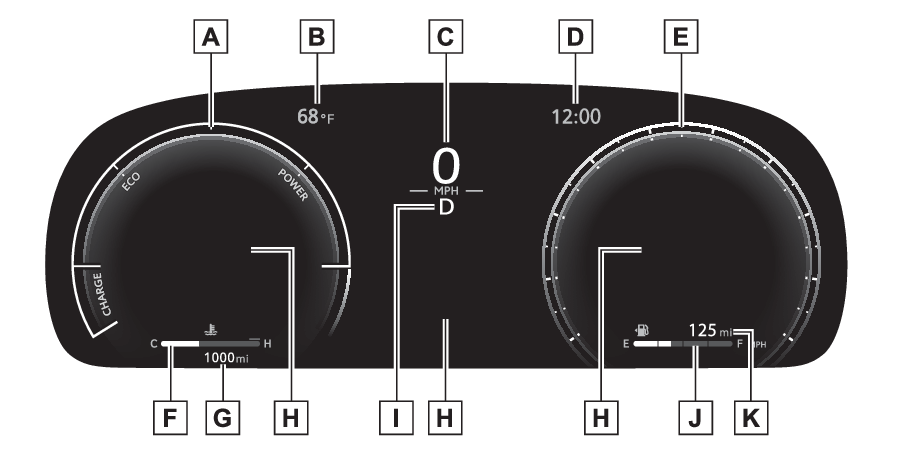
Fuel gaugeFuel gaugeDriving rangeLocations of gauges and metersDisplay type 1/type 2Multi-information displayPresents the driver with a variety of vehicle data (Multi-information display (12.3-inch display))Displays warning messages if a malfunction occurs (If a warning message is displayed)Outside temperatureDisplays the outside temperature within the range of -40°F (-40°C) to 141°F (60°C)Analog meter (display type 2 only)Analog meter can be changed on the setting screen. (Settings (meter display))Analog speedometer: Displays the vehicle speedHybrid System Indicator: Displays hybrid system output or regeneration level (Hybrid System Indicator)Tachometer: Displays the engine speed in revolutions per minuteDigital speedometerShift position/shift rangeClockAutomatically adjusts the time by using the GPS time information (GPS clock). For
details, refer to the “MULTIMEDIA OWNER’S MANUAL”.Widget (audio system-linked display)Displays the selected audio source or track on the meter. (Audio system-linked display)While list of items for content display area is displayed, widget will not be displayed.Driving rangeDisplays driving range with remaining fuel. (Driving range)Fuel gaugeDisplays the quantity of fuel remaining in the tankWidget (fuel economy)Displays fuel economy information. (Fuel economy)While list of items for content display area is displayed, widget will not be displayed.Odometer displayDisplays the total distance the vehicle has been driven.For a while after the hybrid
system has started, distance until next engine oil change is displayed.Engine coolant temperature gaugeDisplays the engine coolant temperatureDisplay type 3Analog meterAnalog meter can be changed on the setting screen. (Settings (meter display))Hybrid System Indicator: Displays hybrid system output or regeneration level. (Hybrid System Indicator)Tachometer: Displays the engine speed in revolutions per minute.Outside temperatureDisplays the outside temperature within the range of -40°C (-40°F) to 60°C (140°F)Digital speedometerClockAutomatically adjusts the time by using the GPS time information (GPS clock). For
details, refer to the “MULTIMEDIA OWNER’S MANUAL”.Analog speedometerEngine coolant temperature gaugeDisplays the engine coolant temperatureOdometer displayDisplays the total distance the vehicle has been driven.For a while after the hybrid
system has started, distance until next engine oil change is displayed.Multi-information displayPresents the driver with a variety of vehicle data (Multi-information display (12.3-inch display))Displays warning messages if a malfunction occurs (If a warning message is displayed)Shift position/shift rangeFuel gaugeDisplays the quantity of fuel remaining in the tankDriving rangeDisplays driving range with remaining fuel. (Driving range)Meter
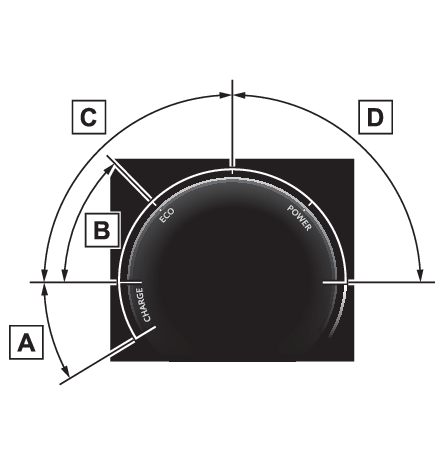
Hybrid System IndicatorHybrid System IndicatorHybrid System IndicatorCharge areaShows regeneration* status.Regenerated energy will be used to charge the hybrid battery (traction battery).Hybrid Eco areaShows that gasoline engine power is not being used very often.The gasoline engine will automatically stop and restart under various conditions.Eco areaShows that the vehicle is being driven in an Eco-friendly manner.By keeping the bar display within Eco area, more Eco-friendly driving can be achieved.Power areaShows that an Eco-friendly driving range is being exceeded (during full power driving
etc.)*When used in this manual, regeneration refers to the conversion of energy created
by the movement of the vehicle into electrical energy.Note:Engine speedOn hybrid electric vehicles, engine speed is precisely controlled in order to help
improve fuel efficiency and reduce exhaust emissions etc.There are times when the
engine speed that is displayed may differ even when vehicle operation and driving
conditions are the same.Hybrid System Indicator will operate whenThe Hybrid System Indicator will operate in the following situations:The “READY” indicator is illuminated.The shift lever is in D or S.Outside temperature displayIn the following situations, the correct outside temperature may not be displayed,
or the display may take longer than normal to change:When stopped, or driving at low speeds (less than 12 mph [20 km/h])When the outside temperature has changed suddenly (at the entrance/exit of a garage,
tunnel, etc.)When “--” or “E” is displayed, the system may be malfunctioning. Take your vehicle
to your Toyota dealer.Driving rangeUse the displayed values as a reference only.This distance is computed based on your average fuel consumption. As a result, the
actual distance that can be driven may differ from that displayed.When only a small amount of fuel is added to the tank, the display may not be updated.
When refueling, turn the power switch off. If the vehicle is refueled without turning
the power switch off, the display may not be updated.Liquid crystal displaySmall spots or light spots may appear on the display. This phenomenon is characteristic
of liquid crystal displays, and there is no problem continuing to use the display.Free/Open Source Software InformationThis product contains Free/Open Source Software (FOSS). The license information and/or
the source code of such FOSS can be found at the following URL.https://www.denso.com/global/en/opensource/meter/toyota/CustomizationThe gauges and meters can be customized in
of the multi-information display. (Settings (meter display))Warning:The information display at low temperaturesAllow the interior of the vehicle to warm up before using the liquid crystal information
display. At extremely low temperatures, the information display monitor may respond
slowly, and display changes may be delayed.For example, there is a lag between the driver’s shifting and the new gear number
appearing on the display. This lag could cause the driver to downshift again, causing
rapid and excessive engine braking and possibly an accident resulting in death or
injury.Notice:To prevent damage to the engine and its componentsDo not let the indicator needle of the tachometer enter the red zone, which indicates
the maximum engine speed.The engine may be overheating if the engine coolant temperature gauge is in the red
zone (H). In this case, immediately stop the vehicle in a safe place, and check the
engine after it has cooled completely. (If your vehicle overheats)Switches
Instrument panel light control switchesMeter
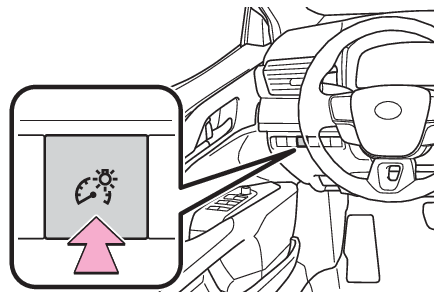
Instrument panel light controlInstrument panel light controlBrightness control
Instrument panel light controlChanging the instrument panel light brightnessEach time the instrument panel light switch is pressed, the instrument panel lights
can be adjusted.Note:Brightness of the meters (day mode and night mode)The brightness of the meters is changed between day mode and night mode.Day mode: When the tail lights are off or when the tail lights are on but the surrounding
area is brightNight mode: When the tail lights are on and the surrounding area is dark