Switches
Parking brake switchParking brake
OperationParking brakeBrake
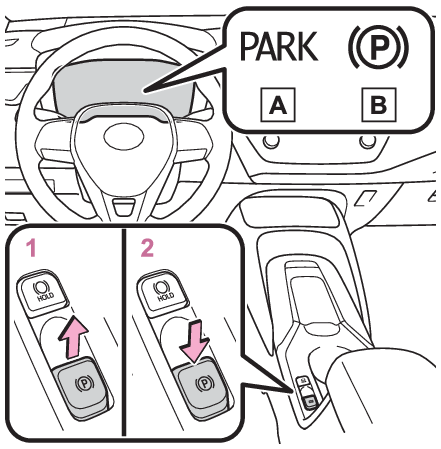
Parking brakeParking brakeThe parking brake can be set or released automatically or manually.In automatic mode, the parking brake can be set or released automatically according
to shift lever operation. Also, even in automatic mode, the parking brake can be set or released manually.Operating instructionsUsing the manual modeThe parking brake can be set and released manually.Parking brake indicator light (for the U.S.A.)Parking brake indicator light (for Canada)Pull the switch to set the parking brake.The parking brake indicator light will turn on.Pull and hold the parking brake switch if an emergency occurs and it is necessary
to operate the parking brake while driving.Press the switch to release the parking brake.Operate the parking brake switch while depressing the brake pedal.Using the parking brake automatic release function, the parking brake can be released
by depressing the accelerator pedal. When using this function, slowly depress the
accelerator pedal. (Parking brake automatic release function)Make sure that the parking brake indicator light turn off.If the parking brake indicator light flash, operate the switch again. (Parking brake indicator)Turning the automatic mode onWhile the vehicle is stopped, pull and hold the parking brake switch until a buzzer
sounds and a message is shown on the multi-information display.When the automatic mode is turned on, the parking brake operates as follows.When the shift lever is shifted from P, the parking brake will be released, and the
parking brake indicator light will turn off.When the shift lever is shifted to P, the parking brake will be set, and the parking
brake indicator light will turn on.Operate the shift lever with the vehicle stopped and the brake pedal depressed.The auto function may not operate if the shift lever is moved extremely quickly. In
this situation, apply the parking brake manually. (Using the manual mode)Turning the automatic mode offWhile the vehicle is stopped and depressing the brake pedal, press and hold the parking
brake switch until a buzzer sounds and a message is shown on the multi-information
display.Note:Parking brake operationWhen the engine switch is not in ON, the parking brake cannot be released using the
parking brake switch.When the engine switch is not in ON, automatic mode (automatic brake setting and releasing)
is not available. Parking brake automatic release functionWhen all of the following conditions are met, the parking brake can be released by
depressing the accelerator pedal.The driver’s door is closedThe driver is wearing the seat beltThe shift lever is in a forward driving position or reverse driving positionThe malfunction indicator lamp or brake system warning light is not illuminated.When depressing the accelerator pedal, depress it slowly.If the parking brake is not released when the accelerator pedal is depressed, release
the parking brake manually.When the shift lever is shifted from P, the parking brake will be released automatically.Parking brake automatic lock functionThe parking brake will be set automatically under the following conditions:The brake pedal is not depressedThe driver’s door is openThe driver’s seat belt is not fastenedThe shift lever is in a position other than P or NThe malfunction indicator lamp and brake system warning light are not illuminatedIf “
Parking Brake Temporarily Unavailable” is displayed on the multi-information displayIf the parking brake is operated repeatedly over a short period of time, the system
may restrict operation to prevent overheating. If this happens, refrain from operating
the parking brake. Normal operation will return after about 1 minute.If “
Parking Brake Unavailable” is displayed on the multi-information display Operate the parking brake switch. If the message does not disappear after operating
the switch several times, the system may be malfunctioning. Have the vehicle inspected
by your Toyota dealer.Parking brake operation soundWhen the parking brake operates, a motor sound (whirring sound) may be heard. This
does not indicate a malfunction.Parking brake indicator lightDepending on the engine switch position/mode, the parking brake indicator light will
turn on and stay on as described below:ON: Comes on until the parking brake is released.Not
in ON: Stays on for approximately 15 seconds. When the engine switch is turned off with the parking brake set, the parking brake
indicator light will stay on for about 15 seconds. This does not indicate a malfunction.When the parking brake switch malfunctionsAutomatic mode (automatic brake setting and releasing) will be turned on automatically.Parking the vehicleParking the vehicleParking brake
Warning messageParking brake
Parking brake engaged warning buzzerParking brake engaged warning buzzerA buzzer will sound if the vehicle is driven with the parking brake engaged. “
Parking Brake ON” is displayed on the multi-information display (with the vehicle reaching a speed
of 3 mph [5 km/h]).If the brake system warning light comes onIf a warning light turns on or a warning buzzer soundsUsage in winter timeWinter driving tipsWarning:When parking the vehicleDo not leave a child in the vehicle alone. The parking brake may be released unintentionally
by a child and there is the danger of the vehicle moving that may lead to an accident
resulting in death or serious injury.Parking brake switchDo not set any objects near the parking brake switch.Objects may interfere with the
switch and may lead the parking brake to unexpectedly operate.Parking brake automatic lock functionNever use the automatic parking brake engagement function in place of normal parking
brake operation. This function is designed to reduce the risk of a collision due to
the driver forgetting to engage the parking brake. Over-reliance on this function
to park the vehicle safely may lead to an accident resulting in death or serious injury.Notice:When parking the vehicleBefore you leave the vehicle, shift the shift lever to P, set the parking brake and
make sure that the vehicle does not move.When the system malfunctionsStop the vehicle in a safe place and check the warning messages.When the vehicle battery is dischargedThe parking brake system cannot be activated. (If the vehicle battery is discharged)When the parking brake cannot be released due to a malfunctionDriving the vehicle with the parking brake set will lead to brake components overheating,
which may affect braking performance and increase brake wear.Have the vehicle inspected by your Toyota dealer immediately if this occurs.