Keys
Replacing the batteryElectronic key
Replacing the batteryWireless remote control
Replacing the batteryReplacing
Electronic key batteryReplacing
Wireless remote control batteryWireless remote control/electronic key battery**If equippedReplace the battery with a new one if it is depleted.As the key may be damaged if
the following procedure is not performed properly, it is recommended that key battery
replacement be performed by your Toyota dealer.Note:If the key battery is depleted The following symptoms may occur:The smart key system (if equipped) and wireless remote control will not function properly.The operational range will be reduced.Items to prepareFlathead screwdriverSmall flathead screwdriverLithium battery CR2032Note:Use a CR2032 lithium batteryBatteries can be purchased at your Toyota dealer, local electrical appliance shops
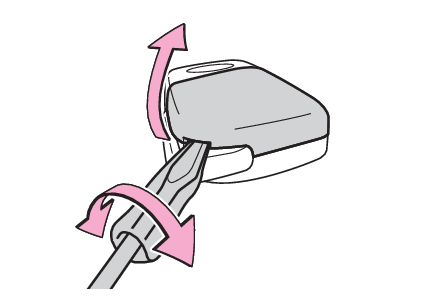
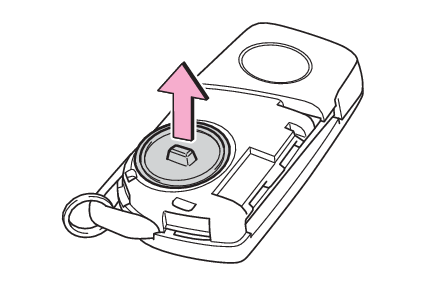
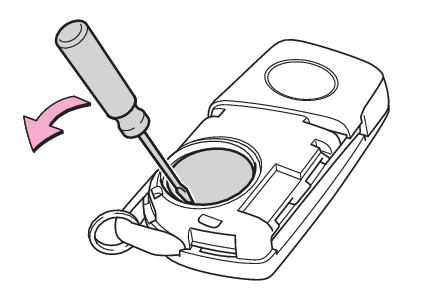
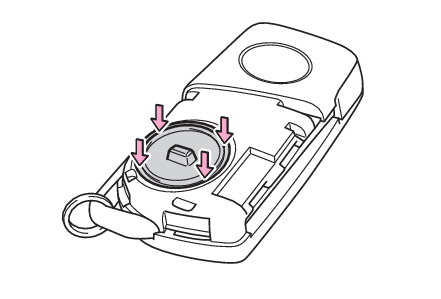
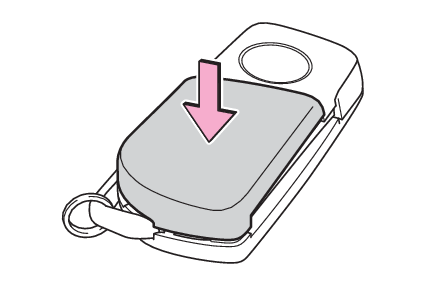
or camera stores.Replace only with the same or equivalent type recommended by the manufacturer.Dispose of used batteries according to local laws.Replacing the batteryVehicles without a smart key systemRemove the key cover.To prevent damage to the key, cover the tip of the flathead screwdriver with a rag.Remove the battery cover.If the battery cover is difficult to remove, lift the edge to remove it.Remove the depleted battery using a small flathead screwdriver.Insert a new battery with the “
+” terminal facing up.Install the battery cover with the tab facing up.Push the entire edge of the battery cover into the key.Install the key cover.Align the key cover with the key and then press it straight into the key.Make sure that the key cover is securely installed without any gaps between it and
the key.Operate the
or
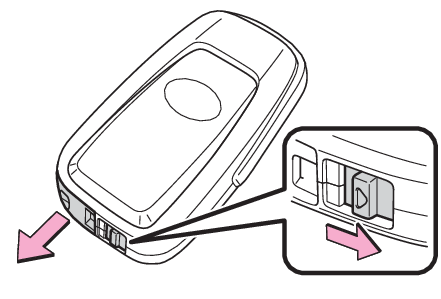
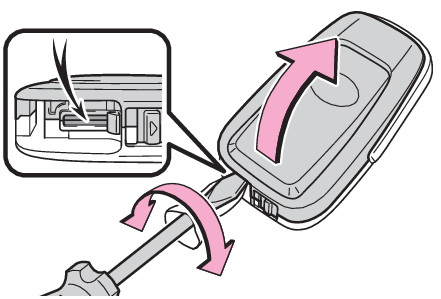
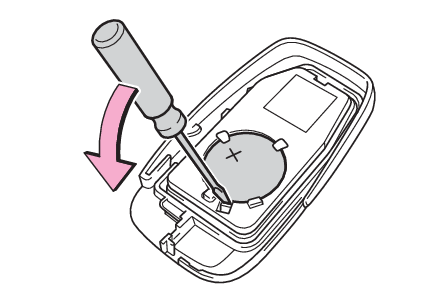
switch and check that the doors can be locked/unlocked.Vehicles with a smart key systemRelease the lock and remove the mechanical key.Remove the key cover.To prevent damage to the key, cover the tip of the flathead screwdriver with a rag.Remove the depleted battery using a small flathead screwdriver.When removing the cover, the electronic key module may stick to the cover and the
battery may not be visible. In this case, remove the electronic key module in order
to remove the battery.Insert a new battery with the “
+” terminal facing up.When installing the key cover and mechanical key, install by conducting step 2 and step 1 with the directions reversed.Operate the
or
switch and check that the doors can be locked/unlocked.Warning:Child safety
Removed electronic key battery precautionsRemoved battery and other partsThese parts are small and if swallowed by a child, they can cause choking. Keep away
from children. Failure to do so could result in death or serious injury.Notice:When replacing the batteryUse a flathead screwdriver of appropriate size. Applying excessive force may deform
or damage the cover.For normal operation after replacing the batteryObserve the following precautions to prevent accidents:Always work with dry hands.Moisture may cause the battery to rust.Do not touch or move any other component inside the remote control.Do not bend either of the battery terminals.When removing the battery cover (vehicles without a smart key system)Do not forcibly remove the battery cover, otherwise it may be damaged.If the battery
cover is difficult to remove, lift the edge to remove it.